
The Google Ads algorithm is tightening its rules: is your profitability at risk?
If you manage Google Ads campaigns on a tight budget, a recent technical alert is well worth your attention. From 17 August 2026, Google is changing the behaviour of automatic bidding strategies Target CPA (Target Cost Per Action) and Target ROAS (Back to Target Advertising Spend) for all campaigns displaying the status ‘On a tight budget’.
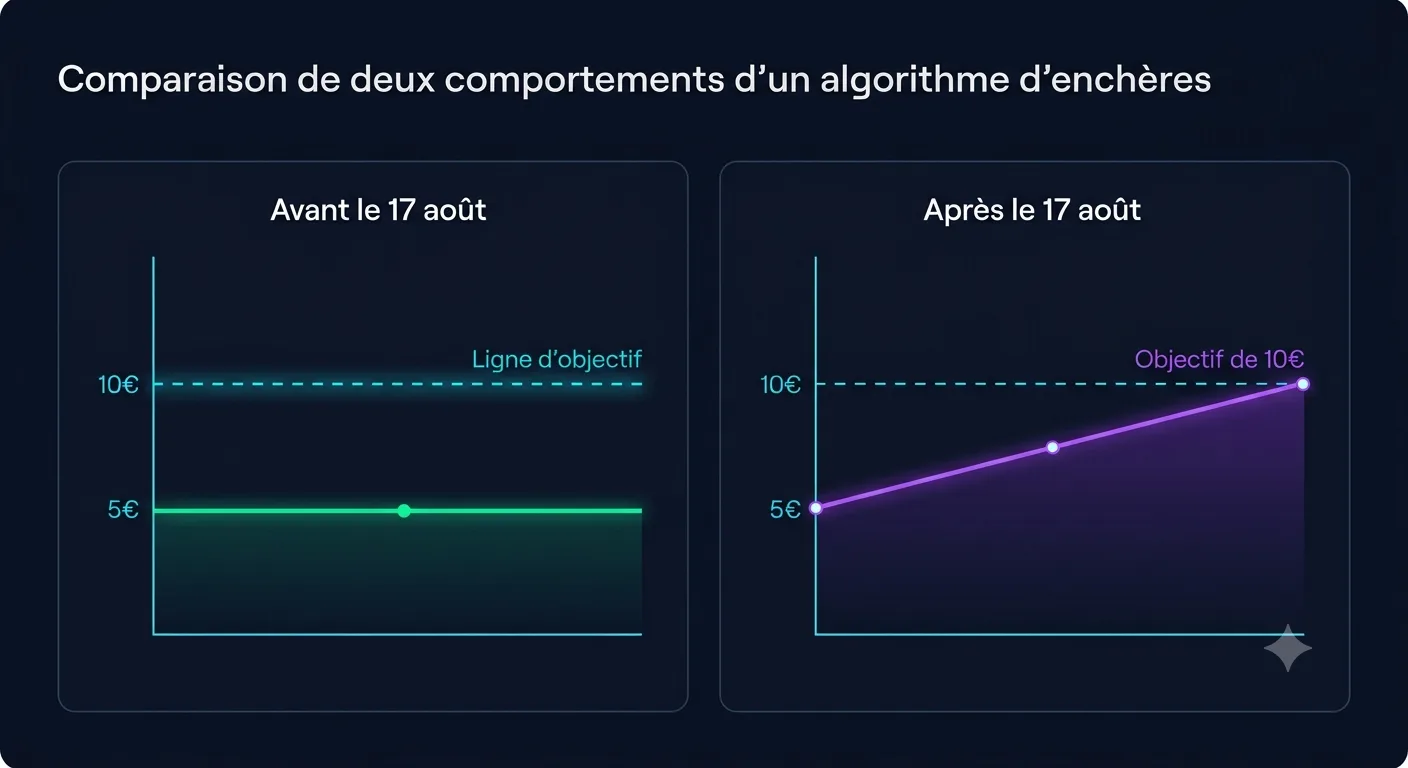
Until now, when your daily budget was insufficient to cover the full demand, the Google Ads algorithm maintained a degree of flexibility: it could generate conversions at a cost significantly lower than your theoretical target without seeking to artificially inflate that cost to reach the exact target.
Those days are long gone. From 17 August, the algorithm will apply a much stricter convergence towards the target you have set. As a result, a highly profitable campaign that was generating customers at a cost below your ceiling could see its costs gradually rise towards your theoretical target.
Key points:
A poorly configured target could effectively give Google permission to charge you more.
What exactly will change on 17 August 2026?
To understand the impact of this update, we need to go back to the fundamental workings of the Smart Bidding from Google Ads.
When a campaign is set up in CPA Cible or Target ROAS, the algorithm adjusts bids in real time for each individual auction to maximise the volume of conversions whilst maintaining the set profitability.
However, when faced with a budget constraint (‘Budget-constrained’ status), the algorithm had to make trade-offs. Historically, Google prioritised the volume of conversions at the lowest possible cost within the daily budget limit, even if this meant displaying an actual CPA well below the target set by the advertiser.
From 17 August 2026, the target becomes a priority alignment rule. The algorithm will actively seek to spend the entire allocated budget by securing more competitive (and therefore more expensive) bids, as long as the average cost remains below the specified target.
Which campaigns are affected?
This update does not affect all Google Ads accounts uniformly. It specifically targets the combination of a targeted bidding strategy and a restricted budget setting.
Target CPA (Target Cost Per Action)
This applies to Search, Display, Discovery / Demand Gen, and Performance Max campaigns configured with the strategy Maximising conversions accompanied by a defined target CPA.
Target ROAS (Target Return on Advertising Spend)
This applies to Shopping, Search and Performance Max campaigns configured with the strategy Maximising the value of conversions along with a defined target ROAS.
‘On a tight budget’ status
This setting is the trigger. A campaign is considered ‘Budget-constrained’ when its average daily budget is lower than the amount recommended by Google to capture all available traffic from your target audiences.
Key points:
If your campaigns have an unlimited budget or one that far exceeds the actual demand in your market, you are not directly affected by this forced convergence. However, for freelancers, coaches, consultants and very small businesses operating on tight budgets (€10, €20 or €50 a day), the risk is significant.
A practical example: from an actual CPA of €5 to a theoretical target of €10
To gauge the direct financial impact on your creator business, let’s take an example that is very common amongst the self-employed and service providers.
Let’s imagine a consultant who offers scoping sessions. They set up a Google Search campaign to acquire qualified leads.
- Daily budget set: €20 per day
- Campaign status: On a tight budget
- Target CPA set during creation: 10 €
- Actual historical results: The algorithm identified excellent opportunities and generated leads at €5 actual CPA.
Earning €20 a day, this consultant made an average of 4 qualified leads per day ($20 / 5 = 4$).
What might happen on 17 August 2026?
The algorithm will determine that the target set is €10. Assuming it has a ‘margin for manoeuvre’ of €5 per conversion, it will bid more aggressively and at higher costs to spend the entire daily budget.
- New actual CPA post-17 August: Alignment to 10 €.
- New volume of leads with the same €20 budget: 2 leads a day ($20 / 10 = 2$).
Result: For the same budget spent (20 €/day), the consultant loses 50% of his daily prospects, simply because he had left a historical target overvalued in relation to his actual performance.
If your campaigns generate interest but then fail to turn this traffic into concrete opportunities, the problem does not always come from Google Ads. Remember to check if your ads do not suffer from ads that generate clicks without any customer key.
How can you spot high-risk campaigns in your account?
Before the deadline of August 17, 2026, you must conduct a quick audit of your Google Ads account. Here is the step-by-step method:
- Connect to your interface Google Ads.
- Access the overview of Campaigns.
- Filter your campaigns by status: On a tight budget.
- Add the following columns to your report:
- Type of auction strategy
- Target CPA (or Target ROAS)
- Cost / conv. (which corresponds to your actual CPA in the last 30 to 90 days)
- Value of conv. / cost (which corresponds to your actual ROAS).
- Find lines where the difference between the theoretical target and the actual result is significant:
- For CPA: If the actual CPA is lower the target CPA.
- For ROAS: If the actual ROAS is higher target ROAS.
Using Google’s Bid Target Adjustment Tool
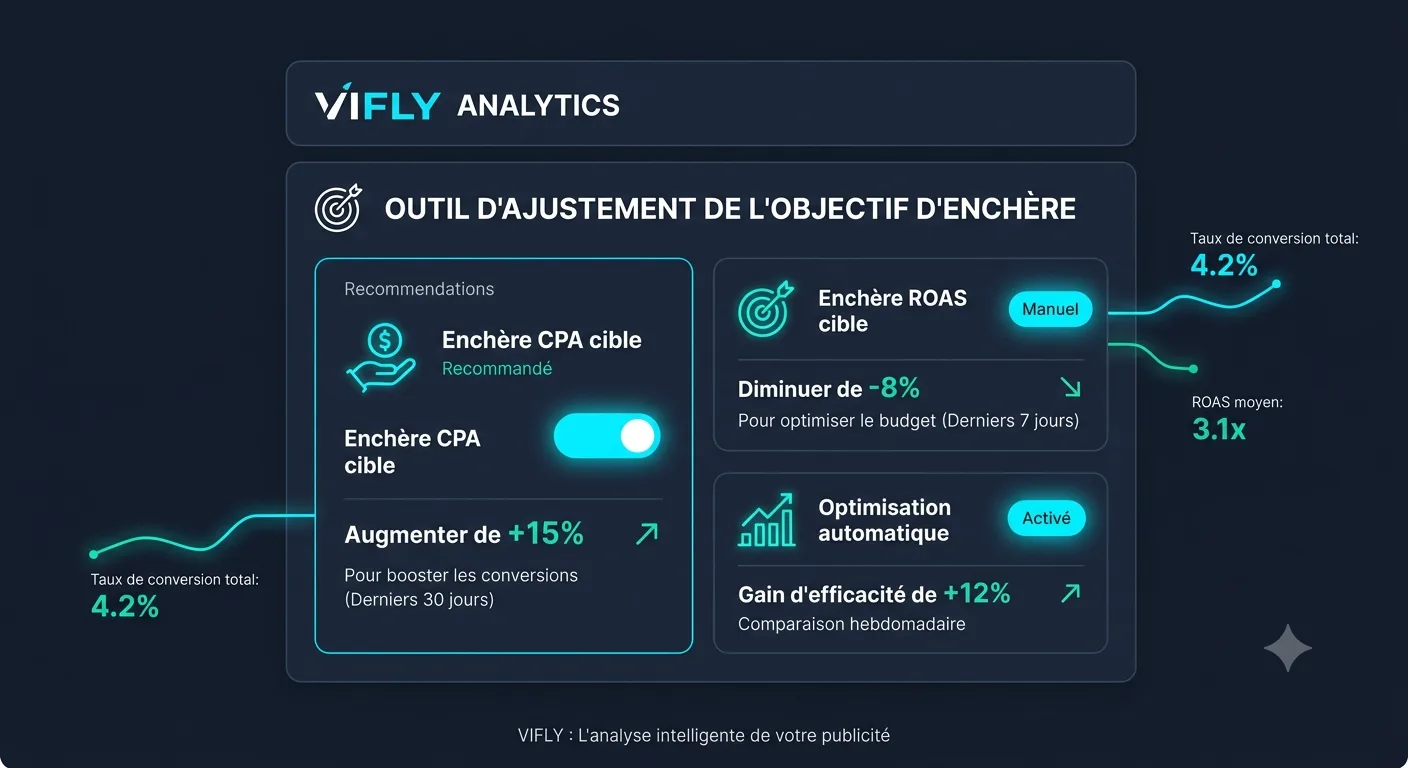
Aware of the potential disruptions for advertisers, Google has made available since July 6, 2026 a dedicated tool: the Bid Target Adjustment Tool (accessible directly from Google Ads' Help Center and Recommendations interface).
This tool analyzes the history of your budget-limited campaigns and offers automatic or semi-automatic adjustments to align your theoretical targets with your recent actual performance before the official shift.
The five possible decisions for your campaigns
In the face of a budget-limited campaign with a real CPA below the target CPA (or with a real ROAS above the target ROAS), five options are available:
1. Keep Target
If you choose to keep your CPA target at €10 as you get €5, expect your cost per conversion to increase, but your overall volume could slightly increase if the market offers new auctions at this price.
2. Alignment with recent performance
This is the most prudent decision for small budgets. By setting the CPA target at €5.20 (close to the 5 real € recorded), you clearly indicate to the algorithm that it should not overbid unnecessarily.
3. Choose a custom target
A balanced approach is to give a margin of 10 to 15% compared to your actual CPA. If your real CPA is €5, set a target to €5.75. You give flexibility to the algorithm while blocking profitability.
4. Change strategy
For some small localization search campaigns, remove the target and use the strategy Maximising conversions pure sometimes avoids erratic behaviour related to artificial targets.
5. Increase the budget
If your creator business model is strong and every €10 conversion pays you €100, the best decision is not to lower the target, but to unblock the budget to remove the status "limited by budget".
What must be measured after 17 August?
Once August 17, 2026, follow these indicators daily for at least three weeks:
- The real CPA / ROAS : Check whether the cost per conversion is maintained or drifting towards the target.
- Lost Print Rate (Budget): This indicator indicates the market share lost due to insufficient budget.
- The Conversion Rate of your landing pages: If the advertising cost increases, optimising your pages becomes the only lever to preserve your overall margin.
Action checklist before 17 August 2026
Here is your operational roadmap to be implemented today:
1. Filter campaigns to "Budget-limited" status 2. Compare CPA target vs CPA real (and ROAS target vs ROAS real) 3. Identify deviations greater than 15% 4. Test Google's Bid Target Adjustment Tool 5. Adjust targets too lax to lock your acquisition cost 6. Optimize destination pages to absorb potential cost increasesConclusions: Beyond Google Ads, optimising your overall conversion rate to offset advertising costs
Changing your settings in Google Ads is essential to avoid budget wastage. But buying attention is only the first half of the marketing equation.
When you pay your more expensive ad clicks, you can no longer afford to send qualified traffic to a slow website, a complex form or a poorly optimized booking schedule.
This is precisely the mission of VIFLY provide independents, consultants, coaches and trainers with a seamless infrastructure to transform each paying visitor into an effective customer.
- Centralize your offers with VIFLY LinkHub : Present a sleek and ultra-fast mobile profile to capture the attention of visitors from your Google Ads or Performance Max campaigns.
- Simplify appointment making with VIFLY Booking : Reduce the friction between the click on the ad and the booking of an open call using an integrated reservation system.
By combining perfectly adjusted Google Ads auctions and a friction-free conversion experience on VIFLY, you protect your profitability regardless of the evolution of advertising algorithms.
Frequently Asked Questions (FAQ): Everything you need to know about the Google Ads change
1. What exactly happens on August 17, 2026 on Google Ads?
From 17 August 2026 Google Ads changed the logic of its automatic auction (Smart Bidding). The algorithm will apply a much stricter convergence to your theoretical target (ACP Target or ROAS Target) for all campaigns with status ‘On a tight budget’. The algorithm will no longer seek only to obtain conversions at the lowest possible cost, but to spend your daily budget as close as possible to the target entered.
2. What is the Bid Target Adjustment Tool and where to find it?
The Bid Target Adjustment Tool is a decision support tool deployed by Google since July 6, 2026. Accessible from the tab Recommendations your Google Ads account or via the official help center, it analyzes the history of your budget-restricted campaigns and automatically suggests the target adjustments necessary to avoid a drift in your acquisition costs.
3. Are all my Google Ads campaigns affected by this change?
No. Only campaigns combining the following two conditions are affected:
- Use a targeted auction strategy: Target CPA (Maximising conversions with target CPA) or Target ROAS (Maximising the value of conversions with ROAS target).
- Show broadcast status ‘On a tight budget’.
If your campaigns have a sufficient budget in relation to market demand, their behaviour remains unchanged.
4. How can I prevent my acquisition costs (CPA) from rising after August 17?
To lock your profitability, you must conduct an audit before August 17, 2026:
- Identify campaigns limited by the budget whose actual CPA of the last 60 days is lower than the target CPA configured.
- Adjust the theoretical target downwards to bring it closer to the actual CPA found (or use the Bid Target Adjustment Tool).
- If the target CPA matches the actual performance, no change is required.
5. Should the daily budget of its campaigns be increased?
No, budget increases are not mandatory. This is a strategic decision: increasing the budget removes the "budget-bound" status and removes the convergence constraint, but it requires cash flow. If your budget is limited, the best option is simply to adjust your CPA or ROAS target to your recent actual performance.
Sources and official references
- Google Ads Official Documentation: About Smart Bidding Auction Strategies
- Google Search Central & Google Ads Help: Updates to Target CPA and Target ROAS behavior for budget-constrained campaigns (July 2026).