
Your campaign may not have failed, but your counting rule certainly has.
You open Ads Manager and the picture seems clear: fewer attributed conversions, a higher cost per result, perhaps even a falling ROAS.
The instinctive reaction is almost immediate. Cut the advert. Change the targeting. Replace the creative. Reduce the budget.
However, this reflex can prove costly.
In March 2026, Meta changed the definition of click-through attribution for campaigns optimised for on-site or in-store conversions. From now on, this category is based exclusively on link clicks. Likes, comments, shares, saves and other interactions that do not involve clicking a link are classified in a different category: engage-through attribution. The roll-out began later that month, with visibility varying depending on the account. Official Meta Business Announcement.
The consequence is simple: two reports with the same title may no longer measure exactly the same thing.
A drop in figures does not therefore automatically mean that your advert is selling less. But nor should it be ignored on the grounds that ‘Meta has simply changed its columns’.
A diagnosis is needed.
Key points
A drop in conversions in Meta Ads may be due to the campaign, tracking or the new attribution model. The dashboard alone does not allow you to distinguish between these three explanations.

What Meta has actually changed
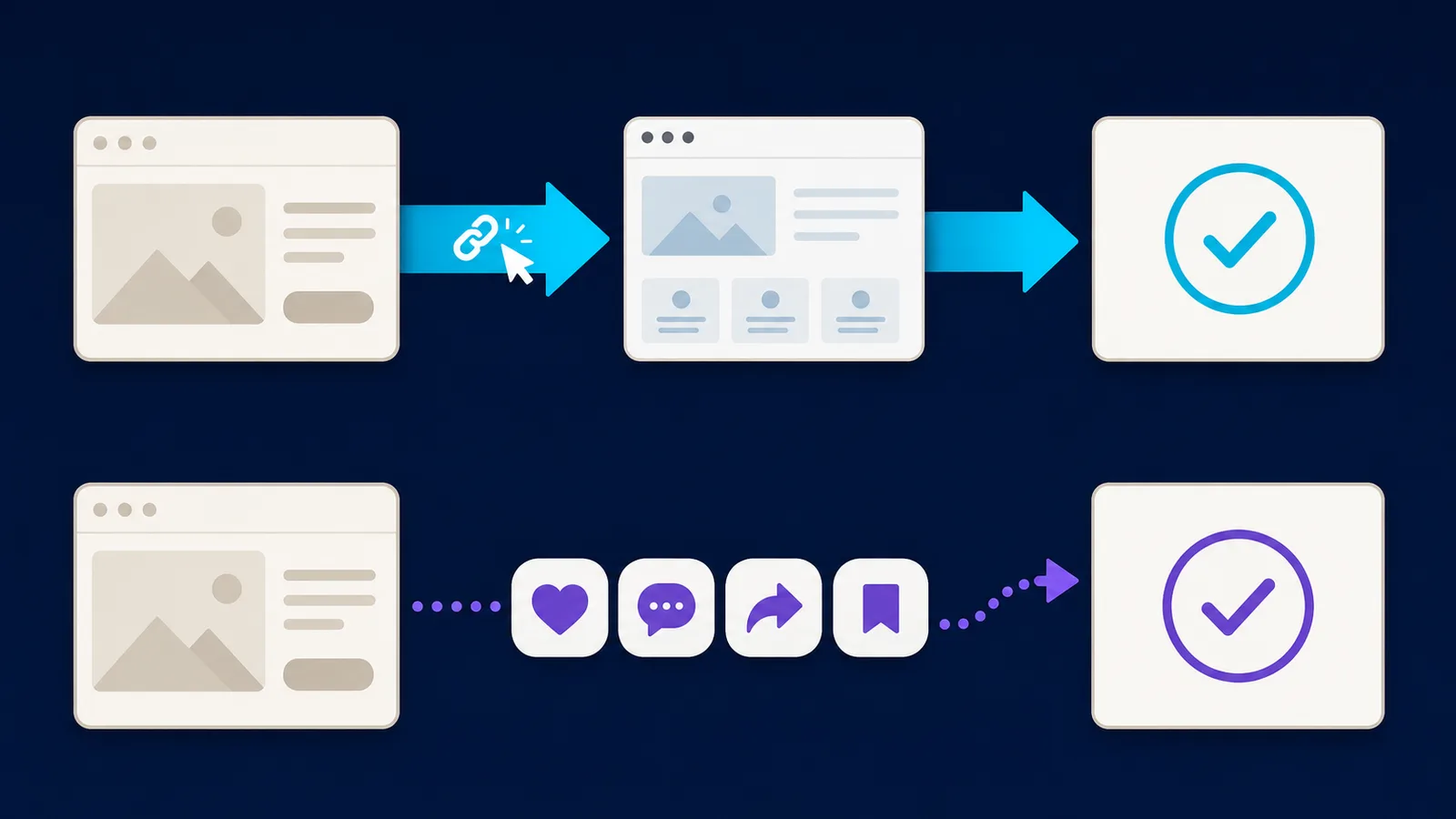
Meta hasn’t simply added a new term to Ads Manager. The platform has distinguished between two behaviours that were previously more difficult to tell apart: clicking on a link and interacting with an advert without following its link.
Click-through: link clicks
A click-through conversion is now attributed when a user clicks on a link in the advert and then performs the tracked action within the selected window.
Depending on the settings available for the campaign, the window may be one day or seven days, for example. Meta now explicitly defines a click-through as a conversion that occurs after a link is clicked. Meta Help on templates and attribution settings.
Bear in mind one often-overlooked detail: A ‘link click’ does not always mean an ‘outbound click’.
A link click can take users to a website, but also to an instant form, a chat, a shop, a profile or another destination that matches the advert format. For a campaign aimed at your website, you should therefore also include outbound clicks and landing page views in your analysis.
These three indicators do not convey the same meaning:
- a click on the link indicates that a destination linked to the advert has been opened;
- the outbound click more accurately measures exit from the Meta environment;
- The landing page view indicates that the page actually had time to load.
An advert may generate 100 link clicks but only 72 landing page views. The difference may be due to a slow page, accidental clicks, a poor connection or the type of landing page.
Engage-through: interactions with no way out
The ‘engage-through’ attribution replaces and extends the previous ‘engaged-view’ logic.
It can attribute a conversion when someone interacts with the advert without clicking on its link, and then converts within one day. Meta includes, in particular, reactions, comments, shares, saves and other clicks that are not link clicks.
This category also includes committed views of a video: at least five seconds of viewing, or 97% of the duration when the video lasts less than five seconds. Official help to configure engagement-through.
This may concern a person who:
- save your ad, then come back to buy the same evening;
- comments on a sponsored Reel, then searches for your brand;
- watch a video long enough, close Instagram, then reserve from another access;
- opens your profile without immediately following the link to the ad, then converts into the day.
Meta thus tries to separate direct action, the click on a destination, from the social or creative influence exerted by advertising.
These are two useful signals, but they do not represent the same level of intent.
Common mistake
Mechanically add click-through and engage-through, then treat each conversion as proof that the advertisement caused the sale.
The attribution indicates that an interaction preceded a conversion in a given window. It does not alone demonstrate that conversion would never have taken place without publicity.
Why your conversions may appear to be falling
The first explanation is reclassification.
Before this change, an interaction such as a like, comment or backup could contribute to a conversion classified in the click-through. Now, this result must appear in engagement-through if it respects its window for a day.
If your report only displays the click-through, some of the conversions seem to disappear.
But the transfer is not necessarily integral.
Imagine that a person saves an advertisement on a Monday and buys on Thursdays without clicking on their link. This conversion could previously be included in a longer click window, according to the old rules. With commitment-through limited to one day, she can now get out of this category.
This is a logical deduction from the windows published by Meta: a link-clicked interaction followed by a conversion between the second and seventh days does not meet either the new definition click-through or the engage-through window of a day.
Conversely, lowering the threshold from ten to five seconds may increase some conversions classified in engagement-through for video campaigns.
Therefore, the change should not be summarized as "the same conversions have simply changed column".
The reality is more precise:
- some conversions go from click-through to engagement-through;
- some may no longer enter the same window;
- some video views become more quickly eligible to engage-through;
- the total displayed depends on the active attribution parameters;
- progressive deployment may complicate the comparison between two accounts.
A voluntarily simplified example
A small business makes 40 verified sales on its shop for two comparable periods.
Prior to the change, Meta attributed 32 sales to advertising under a category mainly read as click-through.
After the change, the same trade volume could appear as:
- 22 click-through conversions;
- 7 engagement-through conversions;
- 11 sales attributed elsewhere, not attributed by Meta or located outside the observed windows.
The store has always recorded 40 sales. However, while the report shows only 22 click-through conversions, the CPA appears to be increasing sharply.
These figures are illustrative. They are neither a Meta average nor an estimate applicable to all accounts.
Action to be taken
Identify the date the new classification became visible in your account. Do not compare a prior and subsequent period as if the definition had not changed.
What hasn’t changed
Advertising Billing
Meta explicitly states that this evolution does not change the way advertisers are billed. It concerns measurement and classification of results. Meta Business Announcement.
This does not mean that the cost of a campaign can never change. The MPC, competition, creative quality, audience or seasonality continue to vary spending and performance.
This only means that this allocation change does not in itself constitute a new method of invoicing.
Real sales and conversions
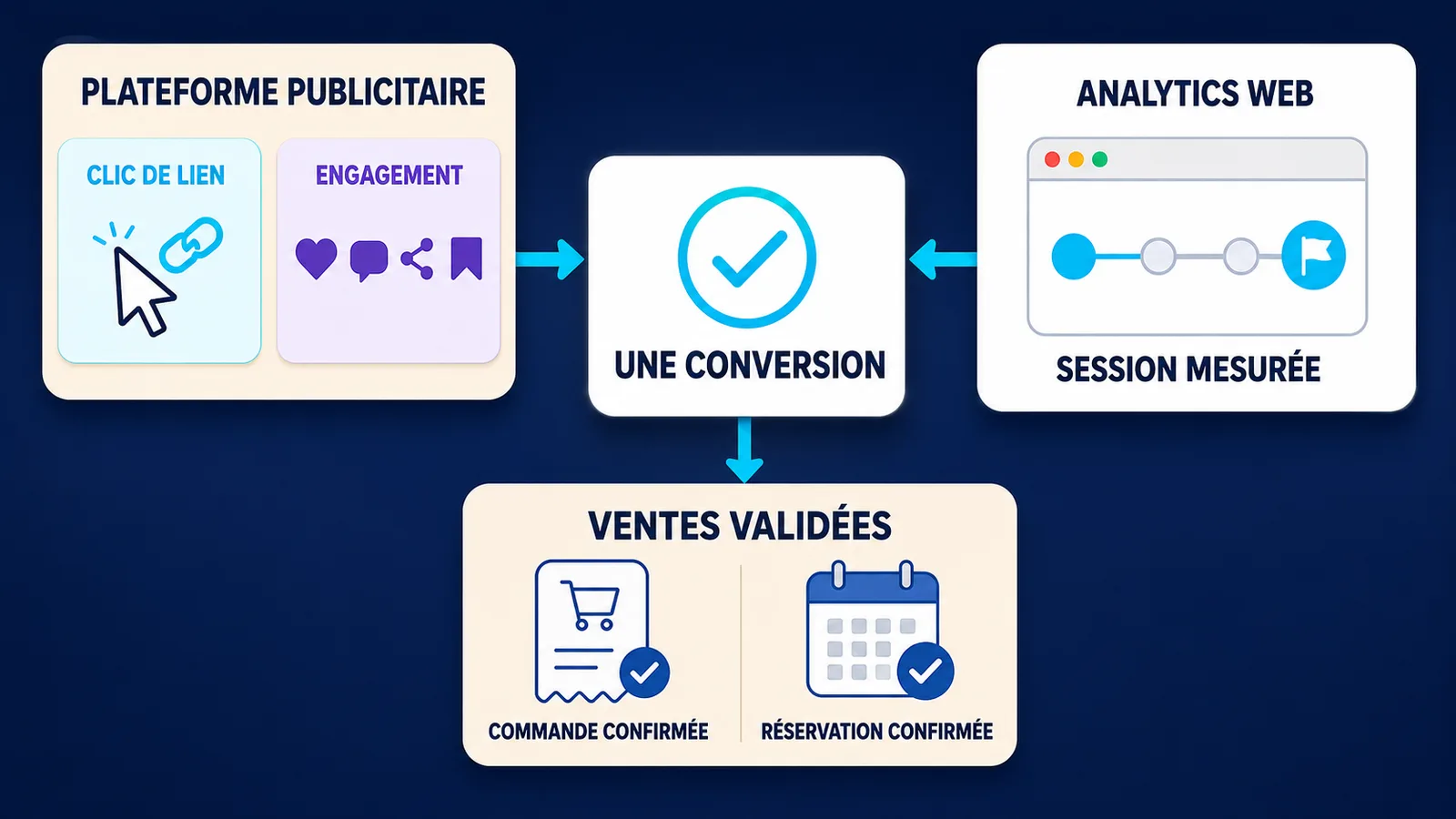
A new definition in Ads Manager does not remove an order from your store, a payment from Stripe, a reservation from your calendar or a qualified prospect from your CRM.
Your source of commercial truth therefore remains:
- orders actually paid;
- valid prospects;
- confirmed appointments;
- the turnover received;
- cancellations and refunds;
- the margin generated.
Meta measures the contribution it assigns to its advertisements. Your trading system measures the end result.
These two sources are complementary, but they must never be confused.
What you should not conclude too quickly
The change in allocation does not automatically explain all the decreases observed in 2026.
If the actual sales decrease, if the destination page views drop, if the form no longer goes back or if your purchase event has stopped working, you can face a real campaign, page or tracking problem.
Meta change is a hypothesis to check. Not a universal excuse.
Columns to add in Ads Manager
The "Results" column can aggregate multiple allocation types according to campaign parameters. It is no longer sufficient to understand the origin of the result.
In Ads Manager, start with a custom view and add the following elements:
To control the diffusion
- amount spent;
- impressions;
- coverage;
- frequency;
- CPM.
To control interest and traffic
- link clicks;
- outgoing clicks, when available;
- destination page views;
- CTR on the link;
- CPC on the link.
To control the assigned commercial result
- results;
- cost per result;
- purchases, prospects or events for your purpose;
- conversion value;
- ROAS on purchases, so relevant.
To understand the attribution
Use Columns → Compare attribution parameters. The official Meta help indicates that this function is in the Performance section of the columns. Select the relevant settings available in your account to separate results from clicks, commitments and views. Compare attribution parameters in Ads Manager.
Tags and options may vary depending on the purpose, conversion destination, account and interface deployment.
Do not change all your campaign settings immediately. Start by comparing the results. An assignment change can also change the signals on which Meta optimizes the broadcast.
Key points
Viewing more columns is not used to produce a more impressive report. This is to know if the ad gets a click, actually loads a page and then generates a verified conversion.
How to create a new performance benchmark
Separate before and after
Meta announced the evolution on March 3, 2026 and its deployment began later that month. However, your new reference should not be based solely on this global date.
Use the first date the new classification actually appeared in your account or exports.
Then create two periods:
- a historical period clearly identified as "old definition";
- a sufficiently stable later period using the new classification.
To establish the new reference, wait at least for the end of the assigned window used and enough conversions to make the result representative. A campaign that generates three sales per month will require more hindrance than a campaign that generates fifty per day.
Compare similar periods:
- same number of days;
- same days of the week;
- close budget;
- comparable offer;
- seasonality taken into account;
- no major modification of the site or tracking.
Compare Meta, GA4 and actual sales
These three sources answer different questions.
Meta Ads asks: did an interaction with a Meta ad occur before the conversion in the selected window?
GA4 asks: which channel and route measured on the site or application should receive the credit according to the attribution model used?
Your shop, Booking or CRM asks : how many sales, prospects or reservations have actually been validated?
Google reminds us that GA4 uses its own templates to credit ads, clicks and route interactions. His reports are therefore not supposed to reproduce exactly those of Meta. GA4 documentation on traffic sources.
To make comparison more reliable, add consistent UTMs to your ad destination URLs:
utm source=meta utm medium=paid social utm campaign=campaign name utm content=name of creationGoogle Analytics uses these settings to identify campaigns that have brought traffic and display them in its acquisition reports. Official documentation on UTMs.
Avoid inconsistent variants such as facebook, fb, FacebookAds and meta for the same source. A stable nomenclature facilitates comparisons.
Build three steering indicators
The CPA platform
Meta expenditureIt helps manage the campaign in the Meta ecosystem, but depends on its rules.
The commercial CPA
Expenditure Meta Φ new customers or prospects validatedIt answers a question closer to real profitability.
The rate of conversion after arrival
Validated sales or prospects ÷ destination page viewsIt helps determine if the problem is after the click.
A campaign can keep a good CTR and a cost per click stable, but convert less because the offer, page or reservation has become less convincing. The VIFLY guide on ads that generate clicks but no customers allows us to examine this second part of the course.
Examples for a designer, a coach, a consultant and an e-commerce retailer
Creator sells digital resource
A person saves the sponsored Reel, then buys the guide three hours later from the profile link.
Conversion may be undertaken through the measurement conditions. GA4 can assign the session to the profile link, social source or other channel depending on the path observed.
The sale remains visible in the payment system.
Coach receives reservations
One person watches eight seconds of a video ad, does not click, then searches for the coach's name on Google and reserves during the day.
Meta can attribute a commitment-through influence related to the committed view. GA4 can consider Google organic as a point of the race route. The booking system confirms the request.
None of these tools necessarily lie. They observe different signals.
To reduce friction after advertising, a page VIFLY Booking dedicated to booking allows to present service, duration, price and slots in a measurable course.
A consultant uses an instant form
The person clicks on the button of the advertisement, opens the form and sends his/her request.
This route can be click-through, even if the destination remains in the Meta environment. That's why link click and exit click should not be used as synonyms.
A trainer receives a sale several days later
The person saves an advertisement on Mondays and buys the training on Thursdays without clicking on the advertising link.
Sales exist. But it goes beyond the engagement-through window for a day and does not rely on a link click. It may therefore no longer be visible in these two categories.
This is precisely the type of situation where CRM, UTM, post-purchase surveys and turnover analysis become indispensable.
An e-Commerce receives a purchase after a click
The person clicks on the product link, visits the shop and buys two days later.
If the tracking works and the selected click-through window covers this delay, Meta can assign the purchase to the link click.
This example represents a signal of intention more direct than a simple backup. It is therefore not necessary to analyse the two routes as if they had the same strength.
Should you amend or cut your campaign short?
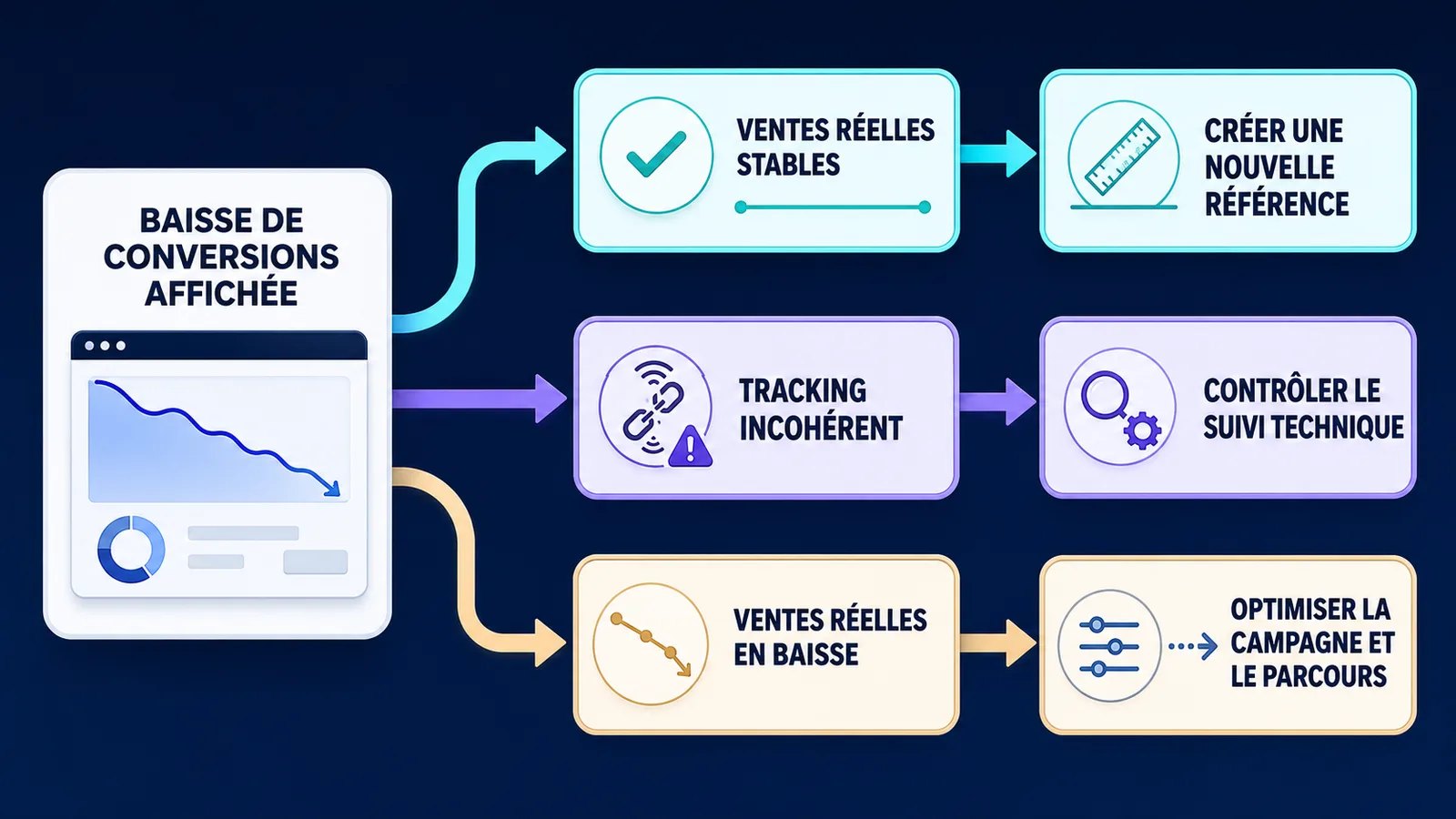
Do not cut a campaign only because the click-through column decreases.
Start with this diagnosis.
The campaign may be maintained during the analysis if:
- validated sales, prospects or reservations remain stable;
- outgoing clicks and destination page views remain consistent;
- the actual commercial cost does not deteriorate;
- the decrease appears mainly in the allocation distribution;
- no tracking or page failure is detected.
The campaign calls for technical investigation if:
- Meta reports fewer conversions while sales remain stable;
- events no longer appear correctly;
- GA4 no longer receives the expected sessions;
- uTM parameters have disappeared;
- destination page views drop while clicks remain stable;
- the form, payment or confirmation page has been modified.
The campaign can really have to be corrected if:
- expenditure remains stable but verified sales are declining;
- the commercial CPA exceeds your threshold of profitability;
- the conversion rate of the destination decreases;
- the frequency increases sharply and the creations simmer;
- the offer, price or promise no longer correspond to the audience;
- the prospects generated are numerous but few qualified.
Do not simultaneously change targeting, creation, budget, page and attribution. You would no longer know what change has produced what effect.
Common mistake
Cut profitable advertising in the sales system because it seems less profitable in a column whose definition has just changed.
The user journey after the click remains crucial
A clearer allocation does not automatically make a campaign profitable.
Even when a real link click is recorded, the person can still give up if they meet:
- too vague an offer;
- a somewhat reassuring profile;
- a slow page;
- too many links without priority;
- a price not found;
- too long a form;
- a reservation only accessible by private message.
Advertising measures the path better until click. She doesn't correct what happens next.
For a conversion-oriented campaign, do not systematically send traffic to a generalist page. Use a destination aligned with the announcement promise.
A LinkHub VIFLY structured may be relevant when advertising presents your universe or several entry points. For a precise offer, place the main action first and reduce distractions.
For coaching, auditing or consulting, refer the user to a dedicated booking page. The goal is not to get the greatest number of clicks, but to shorten the path between interest and action.
This logic complements the method developed in the guide Succeeding in online business in 2026 content, profile, offer and destination must carry the same promise.
Meta Ads 2026 Checklist
Before changing a campaign, check the following:
- the date of the new assignment in your account;
- active allocation parameters at the level of the advertising package;
- the distribution click-through, engage-through and view-through;
- link clicks;
- outgoing clicks;
- destination page views;
- the operation of the conversion event;
- the presence of UTMs;
- sessions and events in GA4;
- sales, prospects or bookings actually validated;
- the commercial CPA;
- consistency between the announcement and its destination;
- the speed and mobile operation of the page;
- recent changes in prices, offers or forms;
- seasonality and days compared.
Keep a capture or export of your configuration. In three months, this trace will be more useful than an approximate memory of your old columns.
FAQ on Meta Ads allocation in 2026
Why did my Meta Ads conversions fall in 2026?
Meta has redefined the click-through so that it relies exclusively on link clicks for the campaigns concerned. Conversions preceded by unlinked interactions are now classified as engagement-through when they respect its one-day window. A drop may therefore come from reporting, but real sales and tracking must be checked before concluding.
What does attribution engage-through?
The commitment-through assigns a conversion to certain non-linked interactions, such as a reaction, comment, share, backup or video view, when the conversion occurs within one day.
Do likes and comments still count in Meta Ads conversions?
They are no longer under the click-through. They can contribute to an engagement-through conversion if the conditions and the attribution window are met. Interaction alone is not a conversion.
Why do Meta Ads and GA4 show different results?
The two tools do not observe the same signals and do not necessarily use the same windows, attribution models, identifiers or consent rules. Meta can assign a conversion after a view or social interaction that GA4 does not see as a session from the ad.
Should I cut a campaign if the click-through decreases?
Not until you have checked engagement-through, exit clicks, destination page views, GA4 and validated sales. If the commercial result remains stable, create a new performance benchmark. If real sales also decline, then look for a problem of campaigning, offering, destination or tracking.
Conclusion: do not run a campaign based on an outdated definition
The change introduced by Meta makes the click-through more understandable: this category is now based on link clicks.
But this clarification creates a break in your history. A curve can change while the campaign, supply and actual sales have not changed in the same proportions.
The right decision is not to blindly trust Meta or ignore Ads Manager.
It involves crossing three levels:
- what Meta attributes;
- what GA4 measures;
- what your creator business actually cashes or validates.
A profitable campaign is not just a column. It is based on a complete journey, from advertising to offer, payment or reservation.
You can Create your VIFLY space to organize your offers, links and reservations in a clearer and measurable course.
Sources used
- Meta Business — Simplifying Ad Measurement for a Social-First World
- Meta Business Help — Set Up Engage-through in Meta Ads Manager
- Meta Business Help — About Attribution Models and Attribution Settings
- Meta Business Help — Compare Attribution Settings in Ads Manager
- Meta Business Help — About Meta
- Google Analytics — Collect Campaign Data with Custom URLs
- Google Analytics — Scopes of Traffic-Source Dimensions
- Search Engine Land — Meta Introductions Click and Engage-Through Attribution Updates
- Jon Loomer — How Meta Ads Attribution Works in 2026