
To choose an online ticketing, compare the full cost on the same scenario and test the essential functions of your event: booking, capacity, payments, entry control and after-sales. The most visible rate is not enough to explain what you will receive or what your team will have to manage.
A ten-person workshop, an associative evening and a festival with several areas do not require the same arrangement. Start by describing your event, then eliminate solutions that do not meet an essential condition.
1. Write down your constraints before looking at the offers
Specify the format, location, number of places, rates and operation of the day J. Distinguish what is indispensable from what would be simply comfortable. An impressive function does not help if it does not meet your need.
- Physical, virtual or hybrid event.
- Tickets are free, paid, discounted or invited.
- A common gauge or separate capacities.
- A simple reception or several teams and entrances.
- A reliable network or offline preparation required.
- Free placement, numbered seats, zones or multiple passages.
- Information required by participant and expected exports.
For a hybrid format, check the access rights. In Ticket, the private participation link is managed at the event level; a "online" tariff name does not automatically create a video restriction. If the rules are to be separate, prepare a suitable device.
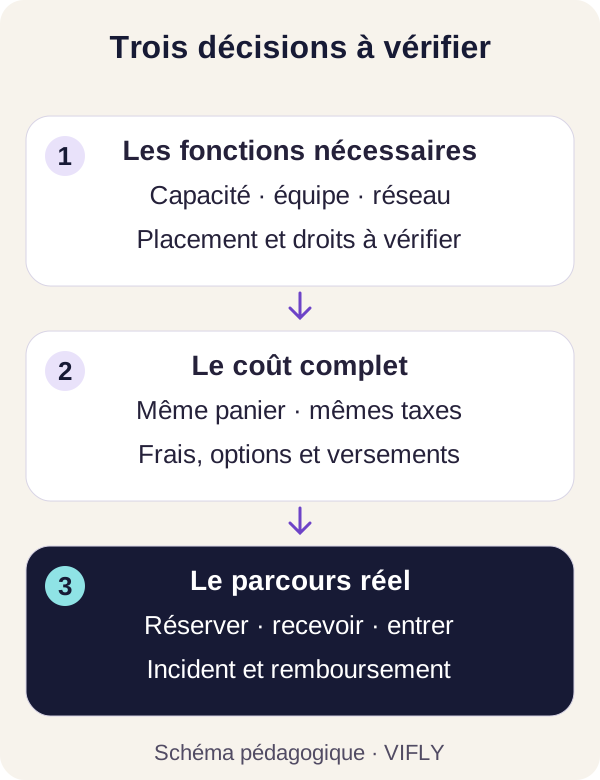
2. Calculates fees with the same basket and tax base
A scale can be charged per ticket, per order, per percentage or with a minimum. Bank charges may be included or separated. Add the applicable taxes and options before comparing the amount available.
Use, for example, a ticket to 20 € and an order for four tickets, 80 € gross revenues. This scenario is not a price recommendation. It only allows to ask the same questions to each offer.
| Post | Question to be checked |
|---|---|
| Ticketing Commission | Calculation by ticket or order? Fixed amount, percentage and minimum? |
| Payment | Bank charges included? What means, country and type of map in the example? |
| Taxes | Are the amounts compared HT or TTC and on the same basis? |
| Options | Equipment, control, placement, support or other additional services? |
| Reductions | On what amount are the fees calculated after a promo code? |
| Cancellation | What fees remain due and how are refunds monitored? |
| Payment | When do the funds become available and under what conditions? |
With VIFLY Ticket, ticketing fees are separate from Mollie or PayPal fees. Free tickets do not support a VIFLY commission. The tariffs page provides the current scale and examples; these examples of commission are not a net bank amount.
For an eligible association, HelloAsso announces a free ticketing or commission for the structure, funded by voluntary contributions offered to the payers. This contribution may be amended or deleted. It must not be presented as a commission imposed on the association. The official model explains this distinction.
3. Understand who cashes and how you get the revenue
Asks on which account the payment is created, who performs the checks, what information is needed and how the payment is carried out. The presence of a payment button does not mean that your file can already cash.
In VIFLY Ticket, the Mollie Connect course uses the organizer's Mollie account. The claimant then manages his payments under the terms of this account. The cash flow managed by VIFLY follows another path: respendable revenues are followed and an verified RIB remittance request is processed by VIFLY.
These differences have a practical effect if you have to pay for the place or equipment before the event. Read it guide to payment methods and verify your eligibility before communicating an opening of sales. No universal payment schedule can be deducted from the name of a solution alone.
4. Test entries in local conditions
The check must recognize the right event, a confirmed ticket, a ticket already used and a situation to be checked. If several people receive, check their rights, the possibility to revoke an access and the available newspaper.
For offline, ask for a full demonstration: preparing the list, shutting down the network, reloading the player, controlling a ticket, finding the line and then syncing. Checks new sales, refunds, expiry of preparation and duplication between devices.
VIFLY Ticket allows this preparation and subsequent synchronization. Local control remains temporary: two disconnected devices can accept the same ticket. The rapprochement indicates the conflict. If your need requires immediate uniqueness between all inputs, organizes a connected control and appropriate connectivity.
Check separately the numbered seats, areas, cashless, exits and re-entry. The Ticket route presented here works in free placement and does not offer these advanced features. A numbered room or festival must be assessed on the basis of its own constraints.
5. Try the journey of someone who discovers your event
Open the page from a phone that is not already connected to your organizer account. Checks the title, date, place, inclusions, price and conditions. Try the keyboard and read the information without depending on an animation.
In an appropriate test environment, verify confirmation, pending payment, ticket and booking recovery. A free ticket can test part of the course, but does not prove the proper functioning of a paid payment.
Then ask an outside person to find the entrance to the place and the procedure to follow if they no longer find their ticket. His hesitations often reveal information missing from the page.
6. Check the after-sales before you need it
See how to find an order, contact the organizer, announce a postponement or cancellation and track a refund. A registered claim, a confirmation of the claimant and the amount in an account are separate steps.
If an order contains more than one person, check the refund per ticket and the refund per amount. In Ticket, one refund per single amount retains the entry fee, while a ticket refund disables the ticket concerned. This difference must be understood by the team.
Also read the data collection and export rules. The input controllers do not need the same access as the organizer. Collecting a name per participant may be useful; asking for sensitive information without need adds constraints and concern.
Four situations to guide comparison
| Situation | Priority criteria | Critical test |
|---|---|---|
| Ten-person workshop | Full price, programme, common gauge and useful information. | Book two places with the right names and find the tickets. |
| Associative event | Eligibility, structure cost, voluntary access and payments. | Compare the HelloAsso model and the full cost of another offer. |
| Concert in free placement | Rates, schedules, entry team, network and incidents. | Test a network shutdown and synchronization of two devices. |
| Seat or Zone Event | Placement, rights, reentry and suitable equipment. | Obtain a demonstration of the exact need before deciding on a solution. |
To complete this grid, the comparison of ticketing maintains links to the tariff sources of the services presented. It is published by VIFLY, one of the compared solutions, and does not replace a demonstration or a contract.
Frequently Asked Questions before choosing
Is the cheapest ticket office always the best choice?
It may be relevant if it meets the needs of your event. Checks the full cost and essential functions. An absent option, a need for hardware or a bad organization of entries can change the choice.
Can a free ticketing service be suitable for a paid event?
Yes, according to his model and the eligibility of the structure. HelloAsso presents this operation for associations. For any offer, read what finances free and applicable conditions.
Can I change the solution after sales are opened?
First check for exports, tickets already issued, refunds and necessary communication. A migration may require a manual reconciliation. It must not leave several contradictory lists on D-Day.
Compare with your event, then try.
The pages workshops, concerts and evenings and associations describe the uses and limitations of Ticket. Explore the demo before setting up your sales.
Sources and method
VIFLY Guide verified on 31 October 2026. Criteria and scenarios are an editorial analysis; no reconstituted universal ranking, fictitious customer review or competing rate is used. Sources: helloAsso economic model, helloAsso ticket office, vIFLY Ticket and documentation Ticket linked in the article. Reread the sources on the date of your decision.