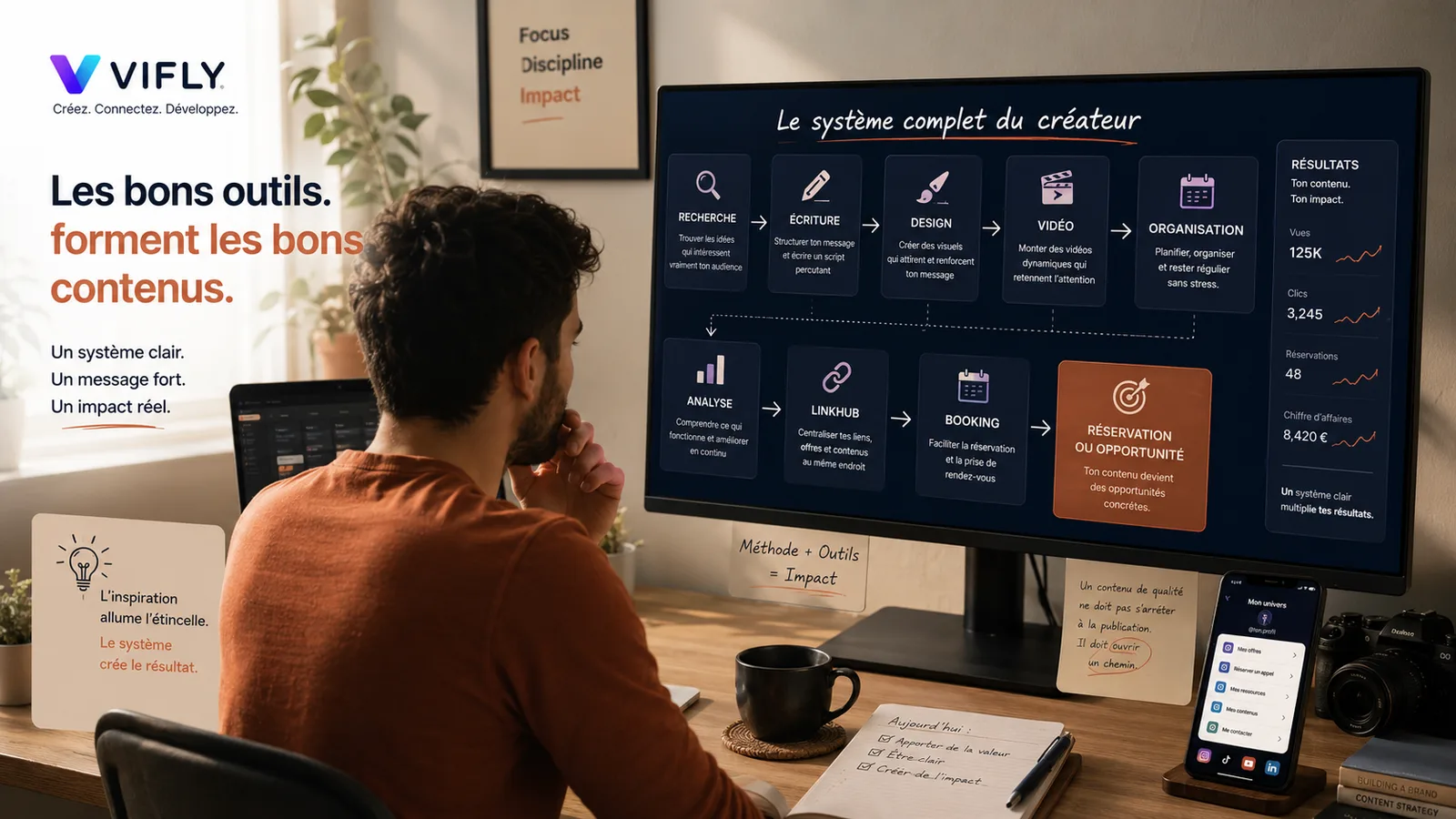
Creating quality content is not just about your inspiration
Many creators think that good content starts with a good idea.
That's right. But that's not enough.
A good idea can be spoiled by a bad angle, a confused visual, too long editing, a text without tension, a poorly presented publication or a link that leads nowhere. Conversely, a simple idea can become very powerful if it is well structured, well dressed, well distributed and linked to a clear path.
This is where the tools become important.
Not because they replace your creativity.
Not because they do the work for you.
Not because they automatically transform average content into viral content.
The right tools are used to reduce chaos.
They help find better topics, better understand your audience, write more clearly, produce more cleanly, publish more consistently and turn your content into a real digital asset.
Because today, creating quality content does not only mean making nice publications. This means creating content that attracts attention, inspires confidence, makes you want to go further and guides the right person towards action.
Good content does not stop when it is seen.
He must open a way.
And this path often begins with a well thought out toolbox.
The real problem: many creators have too many tools, but no method
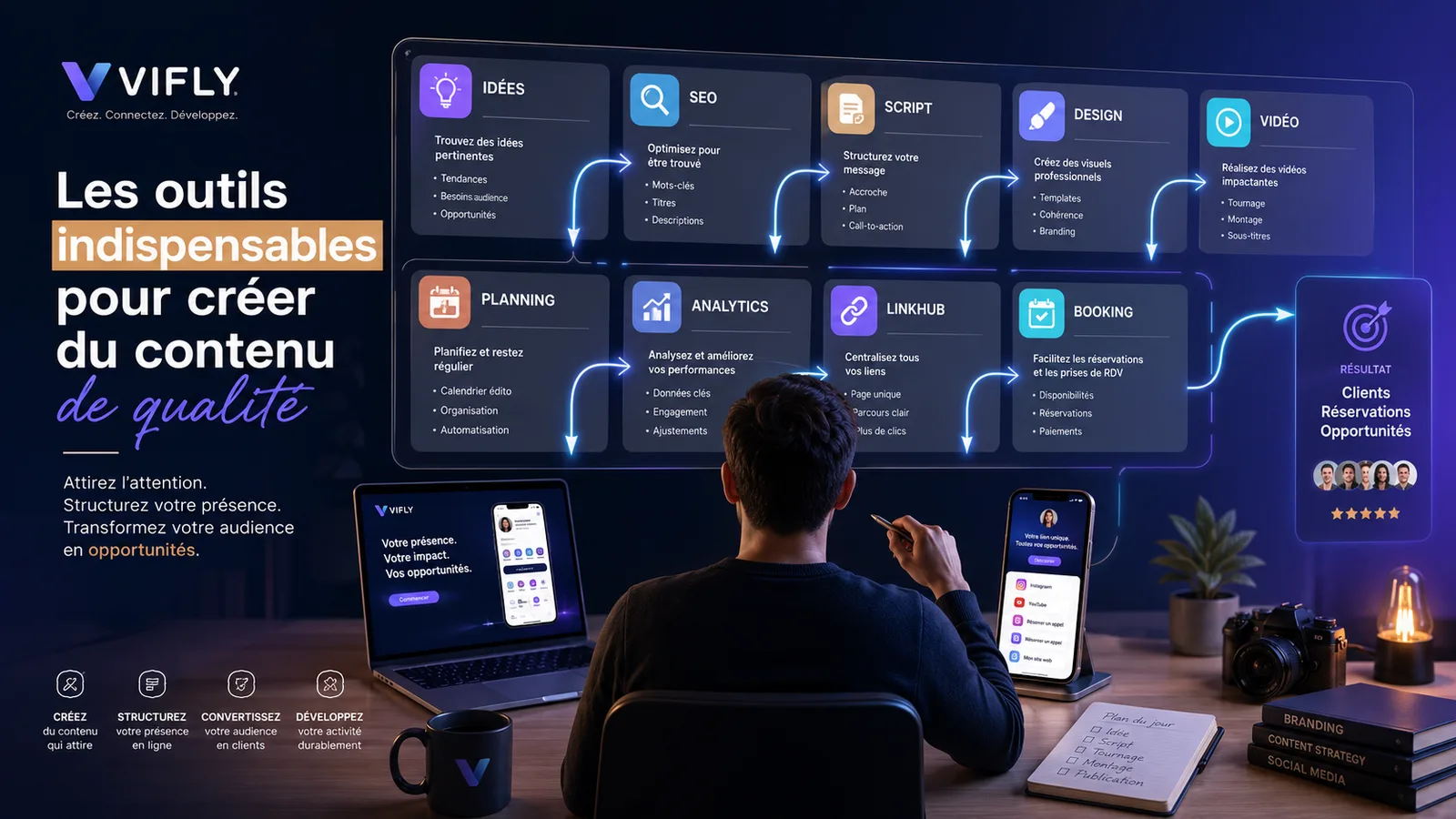
There are now hundreds of tools to create content. Tools to find ideas, write faster, generate visuals, mount videos, program posts, analyze performance, create subtitles, optimize SEO, recycle long content in short content.
So the problem is not the lack of tools.
The real problem is the lack of a system.
Many creators move from one tool to another without knowing exactly why they use it. They test an application because it is trendy. They change software as soon as a new IA feature comes out. They accumulate platforms, templates, tables, scripts and folders... but their content remains unclear.
A tool does not save a confused strategy.
If your message is not clear, Canva will not make it more convincing.
If your offer is not visible, CapCut will not make it more understandable.
If your profile does not reassure, the AI will not automatically create trust.
If your bio link disperses your audience, a good Reel can still lose an opportunity.
That's why before you look for the best tool, you have to ask a more important question:
At what stage of my content journey should this tool help?
A useful tool must serve at least one of these steps: understand, structure, produce, publish, measure or convert.
Without that, he just becomes another distraction.
Search tools: to stop random publication
The first essential tool is not necessarily a design or mounting tool.
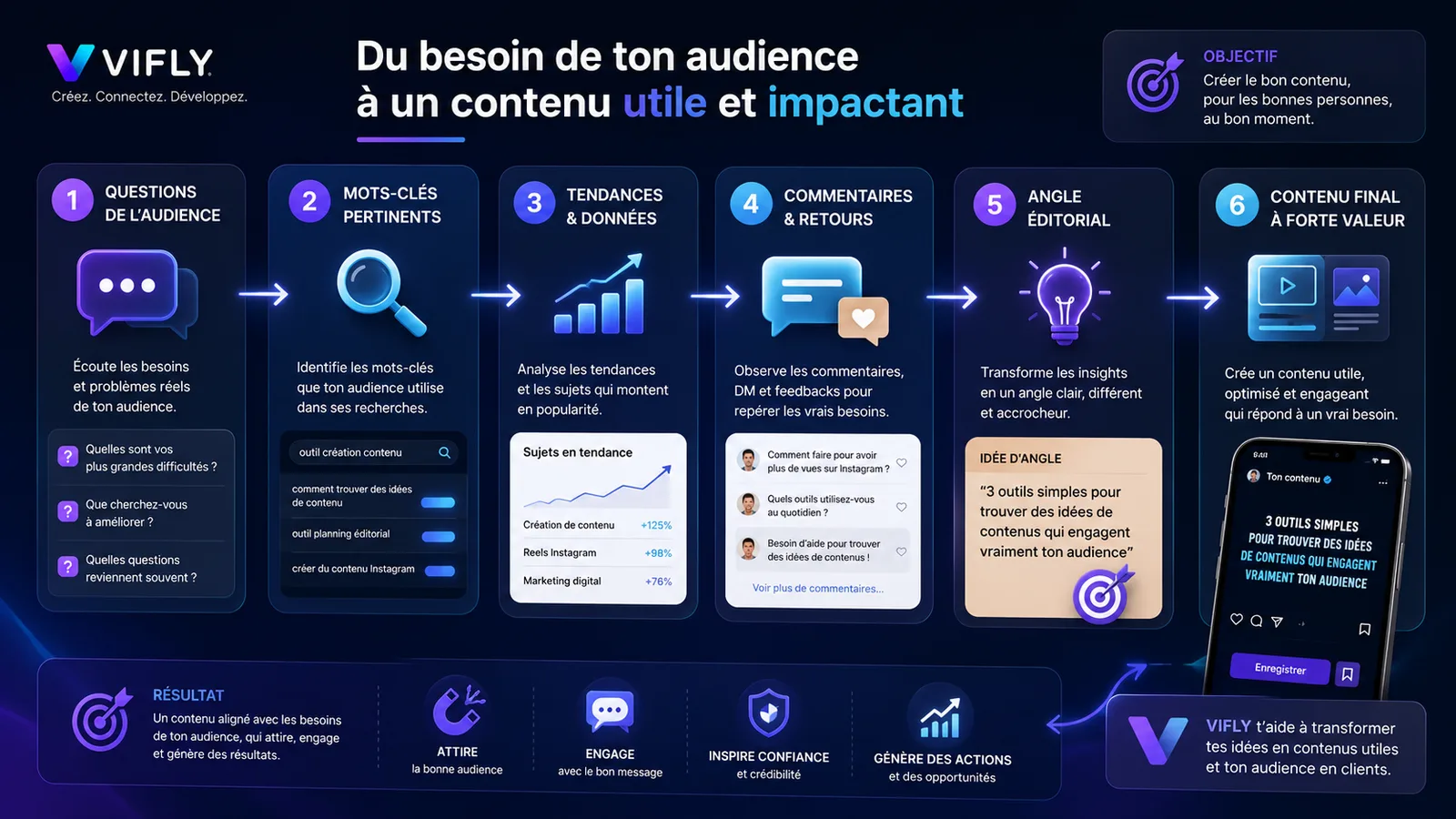
It's a tool that helps you understand what your audience is already looking for.
Creating quality content isn't just about asking: What do I want to say? It's also asking, "What is my target trying to understand? What questions does she ask? What mistakes does she make often? What objections prevent progress
Research tools identify topics that have real potential.
Google Trends can help you see if a subject is progressing, if a search is seasonal or if a keyword is becoming more popular. AnswerThePublic, AlsoAsked or Google suggestions can help identify questions made by Internet users. YouTube, TikTok, Instagram and LinkedIn can also be used as watch tools if you observe comments, related searches, feedback formats and questions posed by your audience.
For a creator, coach or consultant, this step is essential.
It avoids producing content based solely on intuition.
For example, instead of publishing my tips for better communication, you can find that your audience is looking for more: how to find customers when you're a coach, how to create a clear offer, how to structure its bio link, how to get more applications on Instagram or how to sell its services without being too commercial.
The difference is huge.
The first subject is about you.
The others are talking about a problem experienced by your audience.
And content that starts from a real problem has much more chance of being watched, saved and shared.
To deepen this logic, you can link this topic to the article Does Instagram become a search engine?, which explains why creators should think of their content as answers to research intentions, not just as publications in a feed.
Writing tools: to turn an idea into a clear message
A good idea is not enough if it is poorly formulated.
It is often here that many content loses its strength.
The creator knows what he means, but the message becomes too long, too vague, too general or too difficult to remember. The audience includes the theme, but not the click. She reads or looks, then moves on.
Writing tools can help structure your angle, find a stronger hook, simplify an explanation, turn an idea into a short script, create multiple versions of titles or clarify an action call.
Tools like ChatGPT, Claude, Notion AI or other editorial assistants can become very useful if you don't simply ask them: write me a post.
Real power comes from the quality of your demand.
Instead of asking for generic content, ask for a specific angle:
“Transforme cette idée en Reel de 25 secondes pour un coach qui veut convertir son audience.”
Give me 10 emotional hooks on the fear of publishing without strategy
“Réécris ce message pour qu’un indépendant comprenne immédiatement le bénéfice.”
“Trouve une phrase plus courte, plus drôle et plus mémorable pour une vidéo sans voix.”
The tool then becomes a clarification partner.
But he can't erase your voice.
This is an important point: the AI can speed up production, but it can also make content very similar if you use it without intention, without personal experience and without point of view. This is exactly the issue developed in the article I'm not going to kill the creators... Except for those who all look alike.
A good writing tool should not help produce colder content.
He must help you make your message clearer.
Design tools: to look professional without becoming artificial
Design matters.
Not because everything has to be perfect. But because a poorly constructed visual can lose credibility in seconds.
For a creator, consultant, trainer or independent, design often acts as a first sign of seriousness. A legible carousel, a clear cover, a clean visual hierarchy and a coherent identity make you want to stay. Conversely, a loaded visual, too small text or confused layout create friction.
Canva is often the most accessible tool for creating carousels, Reels covers, LinkedIn visuals, miniatures, documents, presentations and simple media. Figma can be interesting if you want to go further on more structured interfaces, models and visuals. Adobe Express or Photoshop can also be useful depending on your level and needs.
But the real subject is not the tool. The real subject is readability. A good visual of content must answer three questions:
Do we understand the subject in a second?
Is the text readable on mobile?
Does the layout reinforce the message instead of drowning it?
A premium visual is not necessarily a complex visual.
For VIFLY, for example, a good visual style is based on UI cards, clean contrasts, consistent colors, simple schematics and immediate reading. The design must give an impression of clarity, no overload.
This is particularly important for Instagram carousels. The first slide has to stop the scroll. The following should guide the reading. The latter must make you want to save, comment or take action.
Video tools: to hold attention longer
Short video has become a central format for creators.
But it is also one of the most demanding formats.
On a Reel, a TikTok or a YouTube Short, the person decides very quickly whether or not to stay. The assembly must therefore serve the attention. It must not only make the video prettier. It must create rhythm, tension, clarity and progress.
CapCut is widely used for short formats, including fast editing, subtitles, templates, simple effects and social media adaptation. DaVinci Resolve can be interesting for a more professional rendering. Premiere Pro remains powerful for more advanced designers. Descript can help on spoken, podcast or video formats where text and voice play a central role.
But again, the tool does not replace the background.
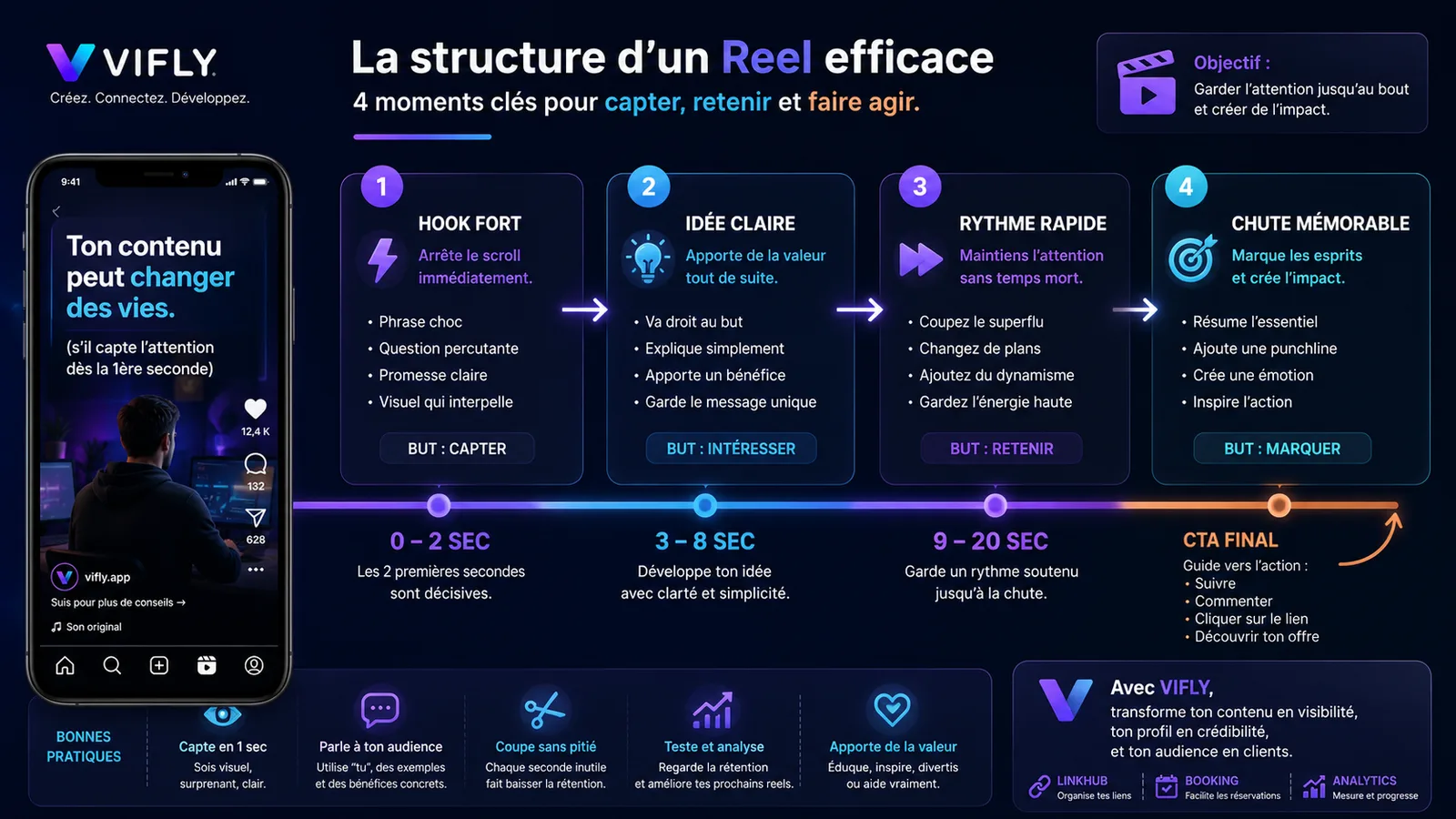
A quality video is based on four elements: a strong hook, a clear idea, a controlled rhythm and a memorable ending.
If you film a simple scene in front of a coffee machine, it's not the camera that will create the performance. It's the text displayed, the situation relatable, the timing, the fall and the connection to your universe.
For example:
When you choose your coffee with more strategy than your content
This sentence works because it is short, visual, funny and directly related to a real problem: many creators publish without strategy.
The right video tool then serves to reinforce the joke, not replace it.
Organizational tools: not to depend on motivation
Regularity is not just about motivation.
It comes mainly from a system.
If you wait till you get a perfect idea every morning, you're gonna run out. If you have to think about yourself, your format, your hook, your visual, your legend and your CTA when publishing, the creation becomes too heavy.
This is where organizational tools become indispensable.
Concept can serve as an editorial calendar, idea base, hook bank, content tracking, publication checklist and strategy table. Trello can be very convenient to visualize the steps: idea, script, design, editing, published, recycled. Google Sheets can be enough if you want a simple and fast approach. Airtable can be powerful in managing a larger volume of content.
The goal is not to have a perfect picture.
The aim is not to start from scratch in each publication.
A good editorial system should let you know:
which topics you want to deal with, for what target, with what objective, in what format, on which platform, with which CTA, and how the content will be reused.
An idea can become a Reel, then a carousel, then a newsletter, then a blog post, then a LinkedIn post.
This is what we call creating a content asset.
Not just publish. Build!
Planning tools: to publish with intent
Programming its contents may seem secondary.
Yet, it is a real lever of quality.
When you program your publications, you get out of the emergency. You can read better, better distribute your topics, balance your formats, avoid publishing three identical content the same week, and build a more consistent editorial line.
Tools such as Metricool, Buffer, Later, Meta Business Suite or Hootsuite can help plan, publish and track certain results.
But be careful: programming does not mean publishing mechanically.
Scheduled content must remain alive.
We need to continue to observe comments, respond to messages, adjust future topics and find out what really resonates with your audience.
Planning tools help keep pace.
But it's your listening that improves strategy.
Analyzing tools: to understand what really works
Creating content without analyzing is moving with the eyes half closed.
Likes are useful, but they're not enough.
Content can have a lot of likes and generate no opportunities. Another can make fewer views, but attract highly qualified prospects. A post may have few comments but many backups. A video may not explode, but bring visits to your profile. A carousel can create little noise, but strongly strengthen confidence.
We must therefore look at the right signals.
On Instagram, you can observe retention, backups, sharings, profile visits and clicks. On YouTube Shorts, you can watch the average viewing time, retention rate, views, and subscriptions generated. On LinkedIn, you can observe the impressions, comments, clicks and conversations triggered. On your site, Google Search Console can help you see which queries bring impressions and clicks.
The analysis must answer a simple question:
What content attracts attention, but which also creates trust and action?
This is a fundamental point for VIFLY. Visibility alone is not enough. As explained in the article Views don't pay bills: how to turn your audience into customers, content can be seen without creating revenue, reservations or opportunities if no clear route takes over.
Conversion tools: not to lose attention after content
This is where many creators lose the most opportunities.
They create content. They attract visitors. They win subscribers. Sometimes they get good returns.
But then?
The profile is blurry. The bio bond is scattered. The offer is not visible. CTA is not clear. Reservations are made in a private message, with too much exchange, too much friction and too much risk of forgetting.
Quality content should not leave the hearing without direction.
It must lead to a next step.
This is where a tool like VIFLY LinkHub becomes essential. Your bio link must not only display your networks. It must organize your universe: offers, content, resources, networks, reservations, contact, newsletter, services, important pages.
A good LinkHub helps your audience understand what it can do after seeing your content.
Read an article. Discover your offer. Book a call. Access a resource. Contact you. Sign up. Buy. Follow a course.
And if you offer calls, coaching, audits, meetings or appointments, VIFLY Booking makes it possible to turn interest into a concrete reservation. Instead of letting the person ask for your availability in a private message, you can present your services, display your slots, allow a reservation and reduce friction.
This is exactly the link between content and business.
Your content attracts. Your profile reassures. Your LinkHub guides. Your Booking converts.
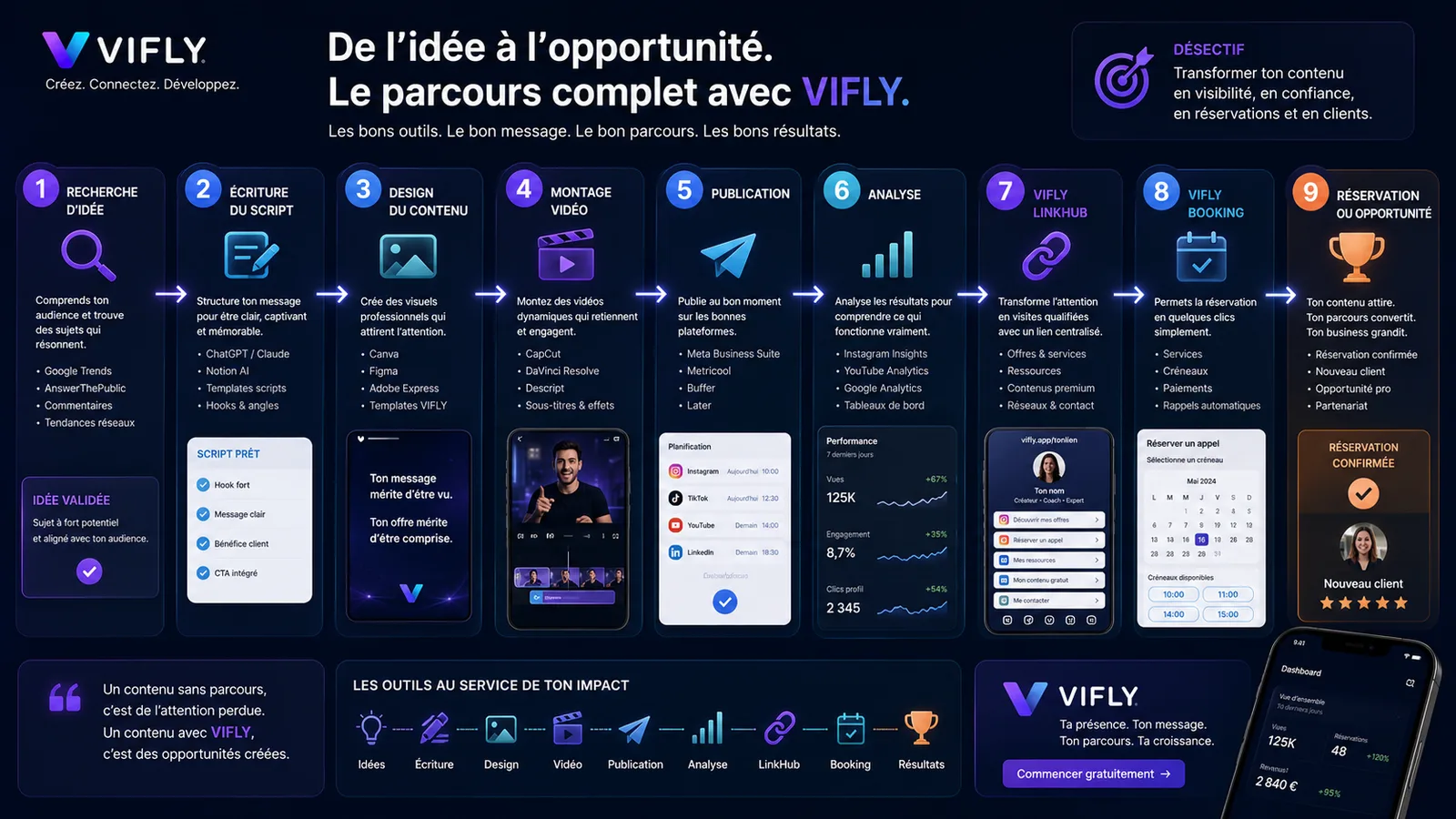
The perfect toolbox according to your level
If you start, you don't need fifteen tools.
You can just start: a note-taking tool, a design tool, a mounting tool, a planning tool and a space to centralize your links.
For example: Notion or Google Sheets to organize your ideas, Canva to create your visuals, CapCut to mount your short videos, Meta Business Suite or Metricool to plan, and VIFLY LinkHub to guide your audience.
If you are already regular, you can go further: add a SEO watch tool, an analysis tool, script templates, a content recycling system, a more complete editorial calendar and a booking page.
If you sell services, your system must include a clear way to submit offers and receive requests or reservations.
Because a creator who publishes without a course built attention.
But a creator who publishes with a journey builds an activity.
Errors to avoid with content creation tools
The first mistake is to believe that a tool will replace your positioning.
A tool can help you shape your message, but it can't decide for you who you help, why you're credible, what you propose and what makes you different.
The second mistake is to overproduce.
Creating more content is of no use if each content says the same thing, with no angle, no nuance, no proof and no real utility. Google also emphasizes the importance of useful, reliable and created content for people first. This also applies to social networks: content designed only to fill a calendar often ends up seeing each other.
The third error is to copy the formats without understanding logic.
A trendy hook, viral music or a nice template do not replace a clear message. It is better to have a simple video with a strong idea than a complex editing that doesn't say anything.
The fourth mistake is to forget the rest.
Content can be excellent, but if the interested person doesn't know what to do after, you lose part of the value created.
The fifth mistake is never to analyze.
Without analysis, you don't know if your content attracts the right people, strengthens your credibility, generates clicks, triggers requests or creates reservations.
The simple checklist to choose your tools
Before you add a new tool to your routine, ask yourself these questions:
Does he buy me time?
Does it improve the clarity of my message?
Does it improve visual or sound quality?
Does he help me understand my audience better?
Does it help to publish more regularly?
Does it help measure what works?
Does he help turn attention into action?
If the answer is no, it may not be an indispensable tool.
Maybe it's just a distraction.
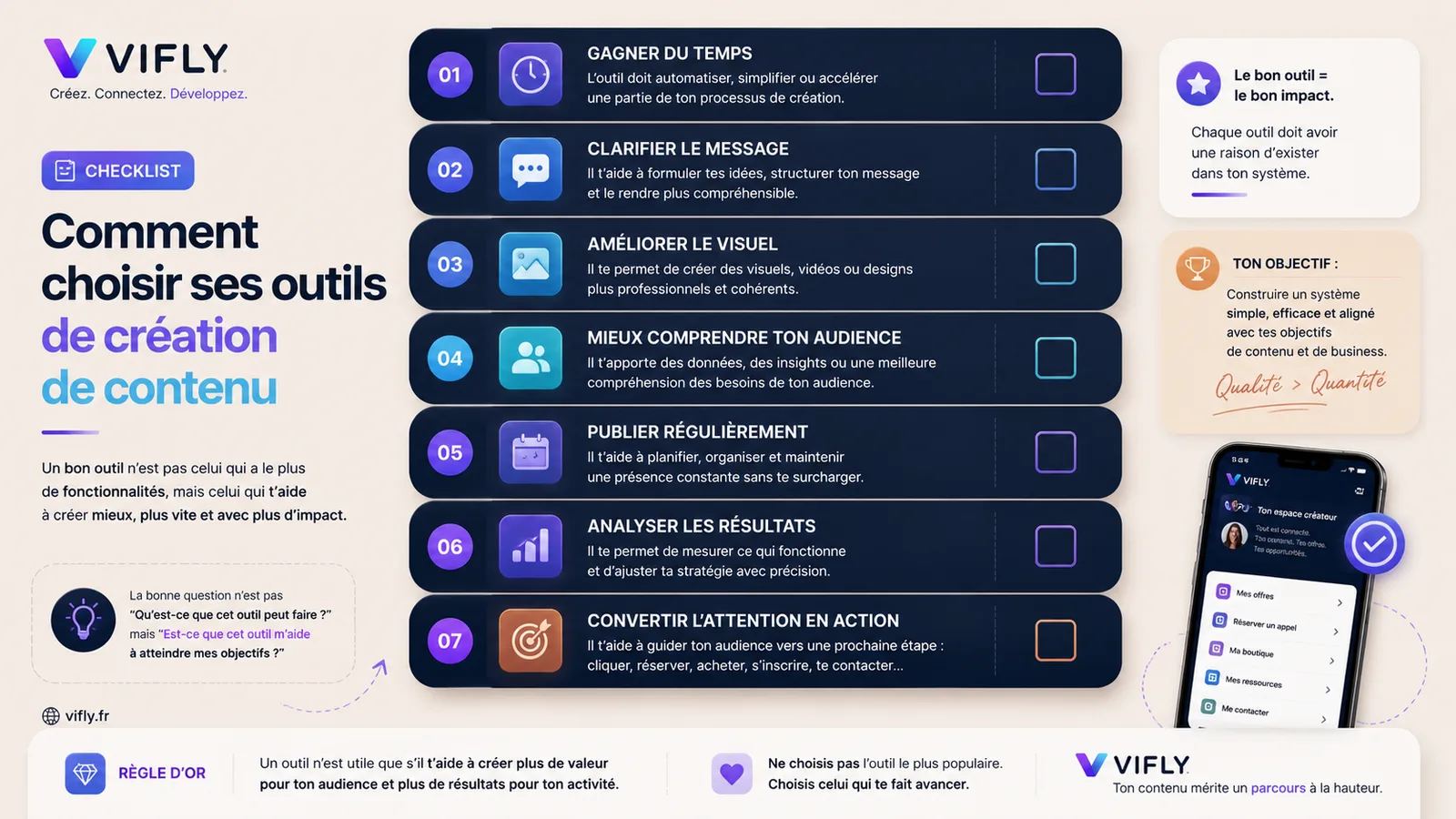
Conclusion: the right tools do not create in your place, they structure your value
The tools needed to create quality content are not only those that save time.
These are those who help to better think, formulate, present, disseminate, analyse and convert.
A good research tool helps understand what your audience is looking for. A good writing tool helps clarify your message. A good design tool helps inspire trust. A good video tool helps to keep attention.
A good organizational tool helps keep it regular. A good analytical tool helps progress. A good conversion tool helps turn attention into an opportunity.
But no tool replaces a clear strategy.
If your message is blurred, your content will remain fragile. If your profile doesn't reassure you, your audience will hesitate. If your bond does not guide, the opportunity will be lost. If your offer is not visible, conversion will be difficult.
Creating quality content is not only a better production. It's building a clearer path.
With VIFLY, you can centralize your links, present your offers, structure your profile and facilitate bookings to transform your visibility into customers, reservations or opportunities.
Key points
A good strategy isn’t just about publishing more. It’s about guiding your audience towards a clear call to action.
Frequently Asked Questions
What are the tools needed to create quality content?
Essential tools are those that help to seek ideas, write clearly, create visuals, mount videos, organize an editorial calendar, analyze results and guide the audience towards action.
Which tool should I use to find content ideas?
Google Trends, Google suggestions, social media comments, YouTube, TikTok, Instagram, AnswerThePublic or AlsoAsked can help identify issues and topics that are of real interest to the audience.
What tool to use to create content visuals?
Canva is one of the most accessible tools for creating carousels, Reels covers, Instagram posts, LinkedIn media and visual marketing. Figma or Adobe Express can also be useful depending on the level of the creator.
What tool can be used to mount Reels or Shorts?
CapCut is widely used for short videos thanks to its simple editing, subtitles and social media formats. DaVinci Resolve, Premiere Pro or Descript may also be suitable as needed.
Why VIFLY is useful after creating content?
VIFLY helps structure the course after the content. With LinkHub and Booking, a creator can centralize his links, present his offers, facilitate bookings and turn his audience into customers or opportunities.
Tools to create, but also to sell
Creating quality content is a first step. To monetize it, you also need an offer, a payment, secure access and a clear path. Consult the guide selling private content online.