
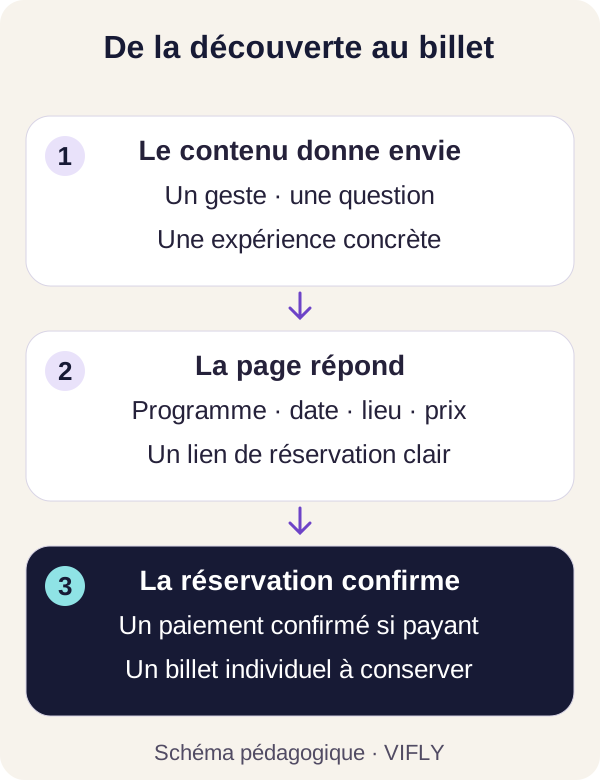
To promote an event on Instagram, show what we're going to do, answer questions that slow down the decision and propose a direct path to a clear booking page. Reels, carrousels and Stories play complementary roles. The good final indicator remains the confirmed reservation, then the presence at the event.
A poster can announce a date without giving reason to come. Conversely, an interesting video can attract views without explaining how to book. The challenge is to link these two moments: discovery and decision.
1. Prepare the page you will send visitors to
Before you multiply the publications, open your page on a phone. In a few moments, can we understand the subject, the audience, the date, the place, the price and the inclusions? Is the booking button identifiable? Are conditions and contact easy to find?
For a workshop, specify the expected level, the material provided and what each will have achieved. For a concert, indicate the opening hours, the programme, the place and the conditions of the different rates. A person arriving from Instagram must find the same promise, the same information and the same price.
Guides organise a paid workshop and prepare a concert or evening ticket office detail the items to display. Publish the link of the event; private order links and QR codes remain confidential.
2. Choose an angle your audience can recognize
The subject is not limited to "inscriptions are open". Leave a desire, difficulty or concrete experience. A beginner workshop can show the first gesture; a professional meeting can be based on a question that stakeholders will answer.
| Public need | Content idea | Next action |
|---|---|---|
| Project | Show a stage, place or authorized extract of preparation. | Consult the complete program. |
| Whether the event is appropriate | Explain the level, audience and prerequisites. | Check the practical information. |
| Understand the price | Present what is included and accompanying. | Choose the appropriate rate. |
| Rise a hesitation | Answer a real question: come alone, equipment, access, hours. | Reserve or ask a specific question. |
Fictitious example for a ceramic workshop: "Did you ever touch the earth? Here is the gesture we learn together before shaping our first bowl. The rest shows this gesture, specifies the duration and invites you to read the program. The video thus keeps the promise of its catch.
3. Gives each format a function
A Reel to Show Experience
Film a gesture, preparation or intervention with a readable framing. A short sequence may suffice if it explains something. Add subtitles when understanding depends on the voice and keep important information easy to read on the phone.
Use images and music that you can broadcast in this context. The filmed persons must know where the images will be used and the necessary authorizations must be verified. An illustration visual should not be presented as a previous edition.
Carousel to clarify the decision
Organizes the content around a question: "Is this workshop made for me?" A possible progression: public, expected result, unfolded, inclusions, place and next action. Keep a number of pages suitable for useful information, without adding screens to artificially extend the course.
Stories to answer and guide
Shows the preparation, answers a question and offers access to the reservation. If the Link sticker is available on your account, use specific wording such as "See Program and Places". Check the link from another account or device. Functions and their location may vary depending on the application and account.
Also keep a path understandable from your profile. If you use a LinkHub, gives the event a clear title and an easy place to spot. A course with several events must make it possible to distinguish dates.
4. Use a calendar that answers successive questions
Here is an editorial framework to adapt to your date, audience and time. It does not guarantee a range or a filling. For a first edition, start early enough to allow people time to organize and correct the questions that appear.
| When | Useful message | Possible content |
|---|---|---|
| J-21 to J-14 | Why come and whom it addresses. | A demonstration and presentation of the programme. |
| J-14 to J-7 | What is included and how it goes. | Carousel, presentation by the speaker, visit to the place. |
| J-7 to J-2 | The answers to the hesitations actually received. | Stories of questions, example of realization, access information. |
| J-2 to J-1 | Accurate availability and practical instructions. | Clear reminder, date, time, location and booking link. |
| Day D | What you need to know to get there. | Entry of the place, hours and useful contact. |
| After | What has been experienced and what can be improved. | Review, permitted returns and possible announcement of the next date. |
The same idea can be shown in several forms without copying the same text everywhere. After a demonstration, a Story can answer "is it suitable for beginners?", then a carousel detail the steps. This progress is accompanied by a decision.
5. Prepare relays with the right people
The venue, stakeholders, a partner association or a neighbouring trade may make the event known to a relevant public. Offer them content ready to adapt: a readable image, the date, a sentence about the interest of the event and the public link.
When the Collabs function is available, a publication or Reel can be prepared with a collaborator who accepts the invitation. Agree on content, timing and practical information. A collaboration does not guarantee that the entire audience of each account will see the publication.
In La Réunion, indicate the commune and the place precisely, without assuming that everyone knows the entrance or the parking conditions. For an online event, specify the reference zone. Metropolis and Réunion schedules may differ depending on the date.
6. Measure the transition from content to reservation
Watch separately the distribution, page visits and confirmed commands. A publication can help people decide several days after their discovery. Another can produce many reactions and few reservations. These results require a reading of the course.
You can distinguish campaign links with parameters such as "utm source=instagram", "utm medium=story" and "utm campaign=atelier-ceramic". Add them to the real link of your event, then test the full URL. Keeps simple names and avoids placing personal data in these settings.
In Ticket, the proposed measure depends on consent and respects the choice not to be followed. Measured visits are not unique visitors; the results do not reconstruct all passages between devices. Compare channels as indications, with their limits.
- Few visits: checks the understanding of the offer, the audience reached and access to the link.
- Visits but few reservations: review the date, price, inclusions and conditions from a phone.
- Reservations started: checks the journey and payment statements before interpreting an abandonment.
- Confirmed notes but absences: works on access instructions and reminders chosen by participants.
7. Engage an advertising budget after testing the course
If you use advertising, define an area, an audience, a coherent goal and a budget that you can actually commit. Starts with a page that works and adapted tracking. Views, clicks and paid reservations do not represent the same result.
Set in advance which will make you continue, adjust or stop the test. An acceptable acquisition cost depends on the budget of the workshop, the number of places and what remains after the costs. There is no cost per universal reservation.
For a small local session, relevant relays and a clear presentation can already be useful. Not announcing an artificial emergency to speed up sales. A waiting list or free places must correspond to actual availabilities.
Frequently asked questions about Instagram promotion
Does it take a lot of subscribers to sell tickets?
The number of subscribers is not sufficient to predict sales. A local and interested public, a clear offer and suitable relays can count more than a large audience not interested in the date or place.
What time should we publish?
Test slots compatible with your audience's habits and organization. Observe your own results on several comparable publications. A universal schedule does not guarantee a better range or reservations.
Should I send a private message to every person who reacts?
First propose a direct path to the program. Answer questions and requests for links. A reaction to a publication is not, on its own, a request for prospecting or registration for a newsletter.
Content attracts. The page must help to decide.
Prepare a booking page adapted to your eventthen share his link in your content. For an association, consult the page dedicated to associative events.
Sources and method
VIFLY Guide verified on 31 October 2026. The calendar and examples are editorial recommendations, without promise of performance. Meta describes how collaborations work in his presentation of Collabs. For functions available on your account, check Instagram Helps on link sticker and profile links ; always check the result in the application. IA-generated cover illustration for VIFLY: fictional scene, without participant testimony.