
Google Search no longer necessarily stops at the answer
Someone is looking for a coach. They specify their sector, budget, expected outcome and availability. Google explores several sources, collates the information, presents options and then makes it easy to book a slot.
This scenario is no longer merely a matter of speculation. At Google I/O 2026, Google unveiled new agent-based features in Search: information agents, price and availability comparisons, direct links to service providers, calls to specific businesses and on-demand interfaces. However, roll-out remains variable depending on country, category, subscription and testing phase.
For a creator, a coach or a freelancer, the relevant question is therefore not: ‘How do I please an AI?’ It is much more practical:
When someone searches, compares and then wants to take action, do they find information that is clear enough to make a decision?
Google has not stated that vague listings will automatically be ranked lower. That would amount to turning an editorial judgement into an official SEO rule. However, when a user or agent needs to compare several services, missing, ambiguous or contradictory information inevitably complicates the decision.
This article does not repeat the basics already covered in our guide on what Google’s AI is actually changing for creators’ SEO. Here, we’re focusing on the next step: making an offer clear, verifiable and easy to book.

What Google actually announced at I/O 2026
Google presents AI Mode as an experience capable of handling complex queries, retaining context and continuing the search as questions are asked. The company reported in May 2026 that this mode had surpassed one billion monthly active users. At the same time, Gemini 3.5 Flash became the default model for AI Mode worldwide. Google — A new era for AI Search.
This development comprises several distinct elements that need to be distinguished.
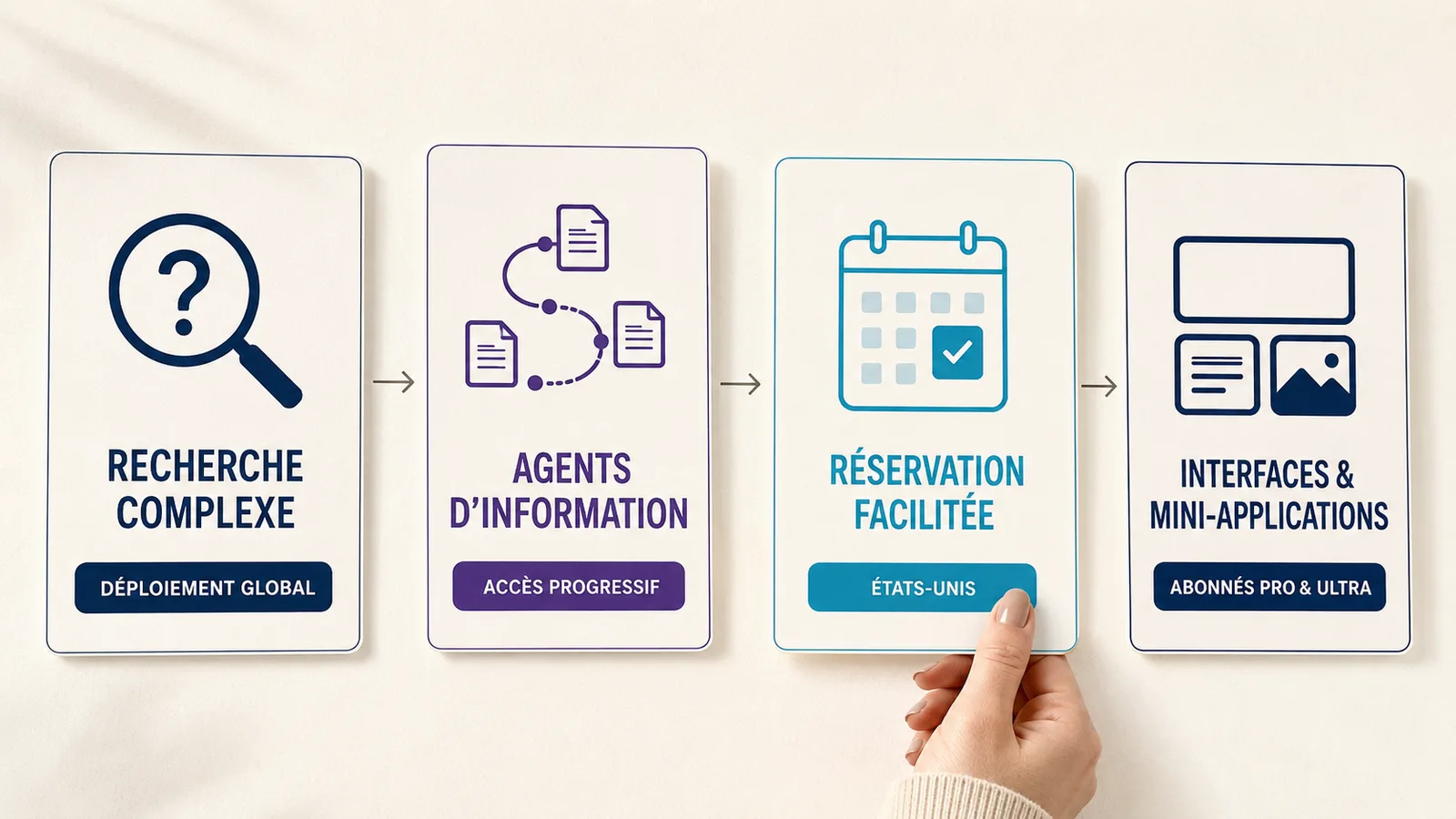
Agents capable of monitoring a search
The ‘information agents’ announced by Google can be configured to run in the background, monitor multiple sources and alert the user when information matching their criteria appears.
At the time of the announcement, the feature was primarily intended for Google AI Pro and Ultra subscribers. It should therefore not be presented as universally available.
Comparisons that get to the heart of the matter
Google is also extending its booking features to new local services and experiences. Users can specify precise requirements and then receive information on prices and availability, along with direct links to complete the booking with their chosen provider.
For certain categories, notably home repairs, beauty and pet care, Google has also announced the option to call businesses on the user’s behalf. The roll-out described at I/O 2026 applied to the United States.
The nuance matters: Google can facilitate the search and the path to booking without necessarily completing the entire transaction, for all categories and in all countries.
Interfaces designed with the user’s needs in mind
Search can now generate interfaces tailored to a specific request: graphics, simulations, interactive components or visual presentations created on the fly.
Google has announced that these interfaces will be rolled out gradually over the summer of 2026. More advanced persistent features — dashboards, trackers and various types of mini-apps — were set to be introduced first to Pro and Ultra subscribers in the United States. Google I/O 2026 — Sundar Pichai’s keynote.
These mini-apps do not mean that every commercial search will result in an app, nor that every offer will be automatically integrated. Above all, they demonstrate that the results page can become an environment in which the user explores, compares and organises their decision.
Key points — AI Mode does not simply replace a list of links with a summary. Google is developing an experience designed to support a longer part of the decision-making process.
The real change: a search can become a decision-making journey
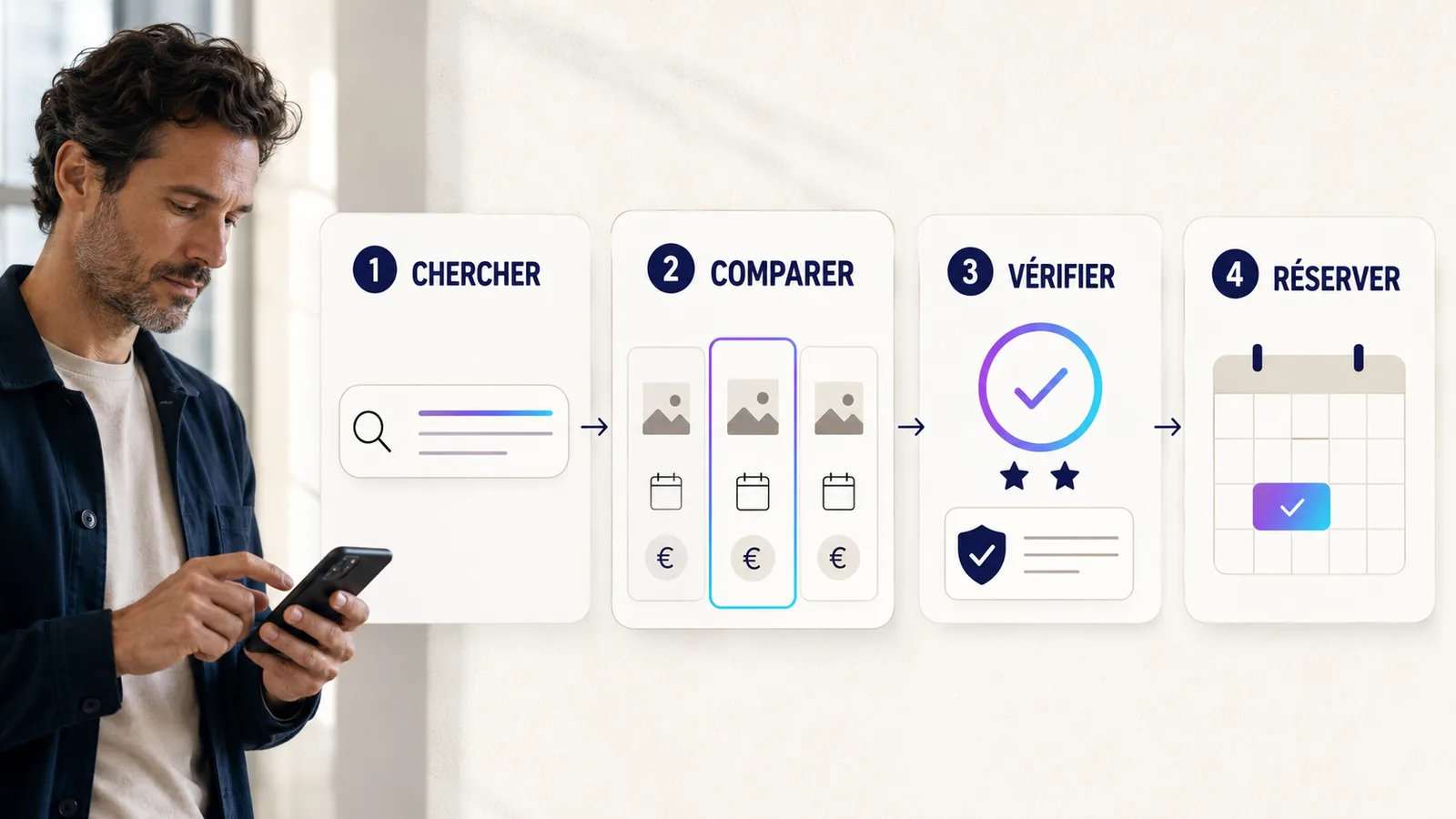
With traditional search methods, a user could view five results, take notes, compare prices and contact several service providers.
AI Mode aims to reduce some of this workload. The user can enter a long query directly:
“I’m looking for a consultant to review my training programme, available remotely, with an initial session of less than 90 minutes and a set budget.”
This enquiry already contains several sub-questions: which consultant is handling this issue? What format do they offer? At what price? Do they work remotely? Do they have a slot available? What evidence underpins their expertise?
Google explains that AI Mode uses, amongst other things, a technique known as query fan-out. The system runs several related searches to explore the various aspects of a complex query. Potentially useful pages therefore do not correspond solely to the exact wording entered by the user. Google Search Central — AI features and your website.
This does not create a new ranking rule called ‘clarity of the offer’. It does, however, increase the value of having pages capable of answering specific questions without requiring the visitor to piece together the offer themselves.
What should Google find when a user compares your offer?
Google Search scans public pages, local information and, depending on the user experience, partner integrations. It is therefore not enough simply to include three keywords on a page. The content must first and foremost answer the genuine questions of the person who is undecided.
An unambiguous professional identity
A page should make it clear who is providing the service, for whom it is intended and in what context.
A business name with no author, a profile with no specific activity, or an offer presented in isolation from any other information creates doubt. Conversely, a consistent professional identity can bring together:
- the name of the person or organisation;
- their profession and specialism;
- people requiring support;
- its geographical area or remote availability;
- their qualifications where relevant;
- a verifiable means of contact.
A deal you can really compare
‘Personalised support’ is not enough to meet a specific search query. This wording provides no details on format, duration, scope or expected outcome.
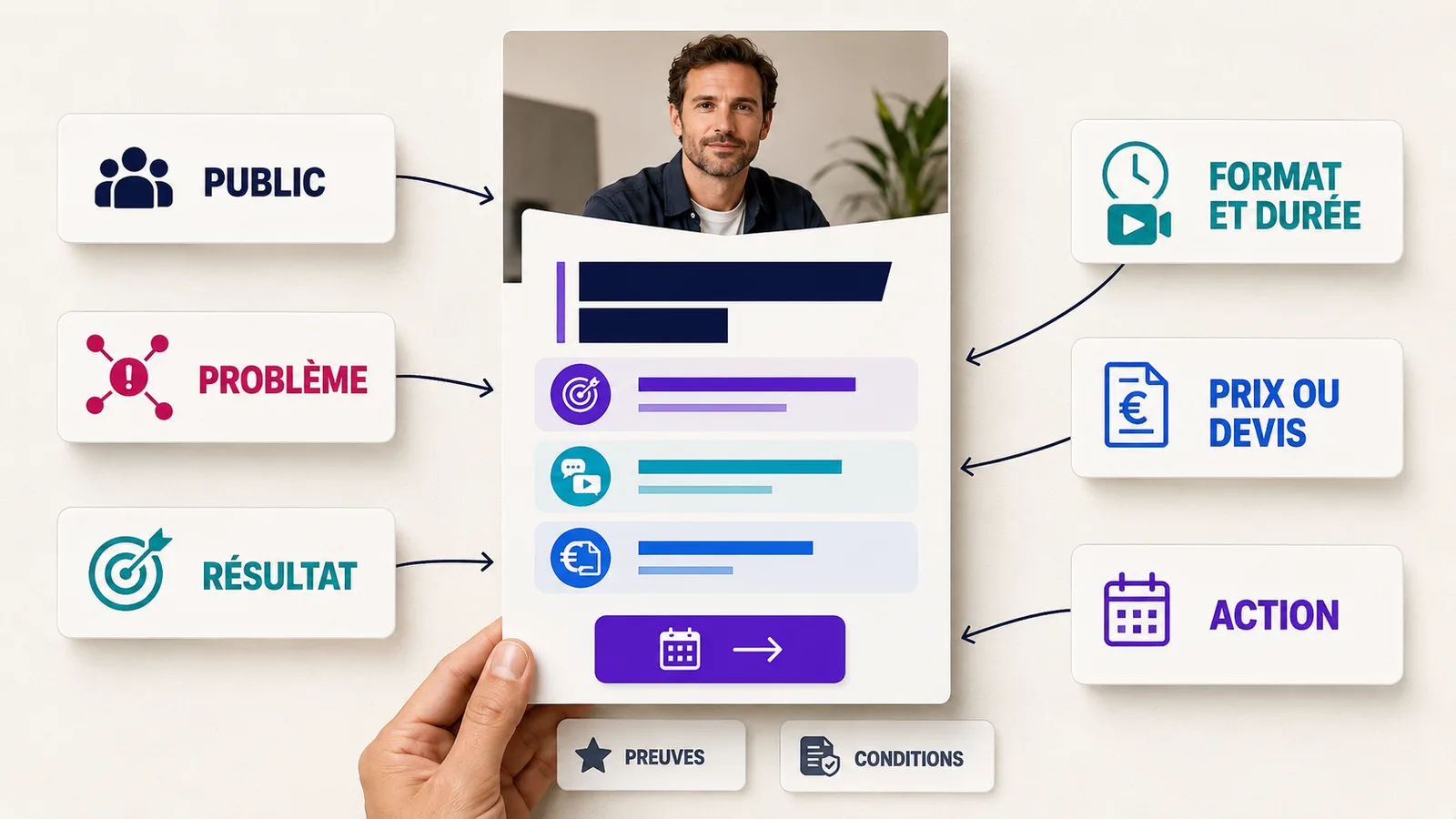
A more effective offer page generally includes:
- the exact name of the service;
- the person to whom it is addressed;
- the issue addressed;
- the expected result or deliverable, without making unrealistic promises;
- the format: phone call, video conference, face-to-face meeting, workshop or delivery;
- duration;
- the rate, a starting price or a clear method for obtaining a quote;
- what is included and what is not;
- important conditions;
- the following action.
Pricing does not necessarily have to be public in all sectors. A complex project may legitimately require a quote. The page should therefore explain how this is calculated and what information the client needs to provide.
Evidence relevant to the decision
A claim such as ‘recognised expert’ carries little weight without verifiable evidence. Useful evidence may take the form of a case study, an example of a deliverable, a genuine testimonial, a qualification, an explanation of a method or documented experience.
For a therapist, caution is essential: accurate qualifications, scope of practice, no unfounded medical claims, and information enabling the identification of situations that fall outside the scope of the service offered.
An action available when the intention is strong
If someone understands the offer but has to search for a contact link, send a vague message and then wait for a reply to find out about availability, the customer journey becomes less seamless.
A clear action could be:
- book a slot;
- request a quote;
- check availability;
- send a brief;
- buy a resource;
- ask a preliminary question.
The chosen action must match the level of commitment required. A visitor discovering a service costing 5,000 euros does not have the same needs as someone wishing to book a 45-minute session.
Common error — multiply the ‘Contact me’, ‘Find out more’, ‘Discover’, ‘Get started’ and ‘Let’s talk’ buttons without explaining what happens after each click.
Turning a vague proposal into a workable one
Let’s take this wording:
“I help entrepreneurs realise their potential through bespoke support.”
It may seem flattering, but it doesn’t tell you what’s on sale.
A more usable version would be:
“A 60-minute video conference session to clarify your service offering, designed for independent coaches and consultants. We’ll identify your core value proposition, your target audience and the three key points to highlight on your service page. You’ll leave with a written summary and an action plan. Price: €120. Book online and choose your preferred time slot.”
This version is not automatically ranked higher by Google. It is simply more useful to the person making the comparison. It also provides more factual information to the systems that need to understand the service.
To build this foundation, use the VIFLY guide dedicated to creating a clear proposal for a freelancer.
Examples tailored to your creator business
Coach
Someone looking for a coach often wants to understand the subject matter, the format of the session, the method, the duration and how to book.
Instead of ‘coaching to help you achieve your goals’, present a specific session: ‘60-minute positioning assessment for coaches who receive visits to their profile but few enquiries.’
Consultant
The consultant must make clear the nature of their assessment and the deliverable.
‘Digital strategy consultancy’ becomes, for example: ‘Digital journey audit comprising an analysis of the profile, the link in the bio, the main offering and the booking process, with a video report and a prioritised action plan.’
Trainer
Prospective participants should be aware of the level, the skills to be acquired, the duration, the delivery method and the entry requirements.
‘Social media training’ doesn’t give much away. ‘A two-hour workshop to create four facecam Reels scripts based on real questions from clients’ already provides a more useful framework.
Freelancer or UGC creator
A company comparing several profiles is generally looking for a scope of work, deliverables, deadlines and usage rights.
A quote may specify: the number of videos, duration, number of revisions, delivery, whether or not source files are included, and terms of use. Creativity remains essential, but it does not preclude commercial precision.
Therapist or support professional
The page must specify the type of appointment, its duration, its price, the venue or whether it is a video conference, the cancellation policy and the context of the practice. It must avoid guaranteeing results and using wording that exceeds the practitioner’s actual qualifications.
A website that can be used by agents is, first and foremost, a good website for humans
Google Search Central explains that agents can perform tasks such as comparing features or helping with bookings. Some browser agents can analyse a screenshot, the DOM and the accessibility tree of a page.
The web.dev documentation therefore recommends maintaining a consistent interface, using semantic HTML links and buttons, correctly associating labels with fields, and making the necessary actions clearly visible. web.dev — Build agent-friendly websites.
In practice:
- include important information in the HTML text, not just in an image;
- use a proper link for navigation and a proper button for an action;
- name the buttons precisely: ‘Book this session’ is clearer than ‘Continue’;
- assign a clear label to each form field;
- avoid elements that change position whilst loading;
- make errors and confirmations visible;
- try navigating using the keyboard and on a mobile device;
- ensure that a promotional pop-up does not obscure the offer or the calendar;
- don’t ask users to create an account before even displaying the essential information.
These practices are not a workaround for AI Mode. They improve accessibility, conversion rates and the ability of various tools to interpret the page.
SEO fundamentals aren’t going anywhere
Google is clear: SEO best practices remain the foundation of Search’s generative features. A page must be crawlable, indexable and displayable with a snippet to be eligible for inclusion as a link in AI Overviews or AI Mode. This eligibility does not guarantee its inclusion. Google Search Central — Optimising a site for generative search.
The priorities remain the same:
- original, useful content based on real-life experience;
- page accessible to Googlebot;
- important information available in text form;
- crawlable internal linking;
- good mobile experience;
- fast loading and a stable interface;
- headings and descriptive subheadings;
- structured data consistent with the visible content;
- Up-to-date Google Business Profile information for local businesses.
Google also states that no llms.txt file, ‘GEO’ markup or special schema is required to appear in its generative features. Structured data may still be useful for general SEO and certain rich results, but it does not guarantee ranking or inclusion in AI Mode.
Key points — Preparing a proposal for the new Search pathways isn’t about writing for a machine. It’s about removing the ambiguities that are already causing confusion for those interested.
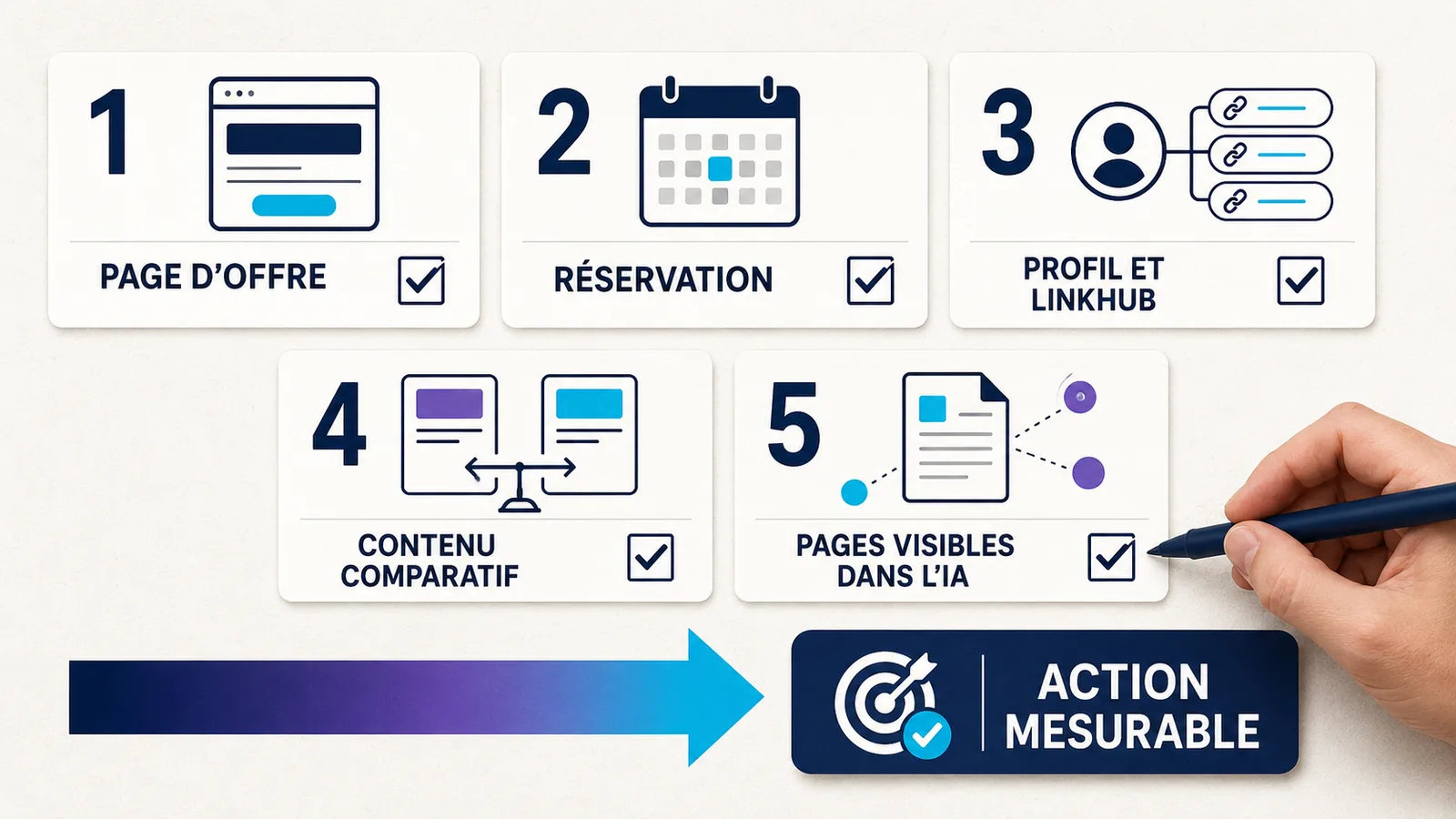
Which pages should be analysed first?
Not every page warrants the same level of effort. Start with those that combine a clear purpose with an expected action.
1. Your main product pages
These summarise the information needed to make a comparison. First and foremost, check the name of the offer, its target audience, its scope, its format, its price or quotation process, its evidence and its CTA.
2. Your booking pages
Test the calendar, time zones, time slots, confirmations, cancellation policies and mobile display. Someone ready to book shouldn’t have to wait until after choosing a time slot to discover essential information.
3. Your professional profile and your LinkHub
Your profile confirms your identity and specialism. Your LinkHub should then prioritise actions rather than simply presenting a list with no order of priority.
A structured LinkHub with a main action can link a search, content or social media profile to the most relevant offer.
4. Content designed to facilitate comparison
An article such as ‘Personal coaching or group training: which option should you choose?’ can help someone clarify their needs before looking at what’s on offer. It should explain the selection criteria honestly, including situations in which your solution is not suitable.
5. Pages already featured in the generative experiments
Use the data available in Search Console to identify pages that are receiving impressions in generative features. Our article on Measuring AI Overviews and AI Mode in Search Console explains the data presented and its limitations.
The most interesting priority is often found at the intersection of four signals: a significant offer, strong search intent, existing impressions and a conversion journey that is still fragile.
The 90-minute audit to prepare your proposal
From 0 to 15 minutes: start with proper research
Write a complete query that your ideal client might type into Google. Include their problem, the context, any constraints, their potential budget and the desired outcome.
This wording reveals the information your page needs to cover.
15 to 35 minutes: check the offer page
An outsider must be able to identify the offering, its target audience, its expected outcome, its format, its duration and how to access it. Remove phrases that require interpretation: ‘comprehensive solution’, ‘far-reaching transformation’, ‘unique approach’ or ‘premium service’ without further explanation.
35 to 50 minutes: add the evidence
Choose the evidence most relevant to the decision: example of a deliverable, method, anonymised real-life case, authentic testimonial, career history or qualification.
50 to 65 minutes: try taking action
Make a booking yourself using a smartphone. Check the number of steps, the information requested, any error messages and the final confirmation.
65 to 80 minutes: check the technical structure
Check indexability, canonical URLs, visible text, links, buttons, form labels, performance and the consistency of structured data.
From 80 to 90 minutes: choose the measurements
Track visibility, visits and actions separately. An impression in AI Mode does not prove that an offer has been understood. A click does not prove that it is convincing. A booking allows you to observe a result that is closer to actual activity.
If you’re already attracting visitors without generating any actions, the analysis presented in Why your adverts get clicks but no customers remains relevant, regardless of the source of the traffic.
Conclusions that should not be drawn too hastily
“Google favours the clearest listings”
Google has not announced any ranking rules formulated in this way. Clarity primarily improves understanding and decision-making. Its effect on visibility depends on numerous factors, which Google does not reduce to this single criterion.
‘All you need to do is add structured data’
Structured data must accurately describe what the reader sees. It is no substitute for content, quality or indexability. Nor does it guarantee an enriched result.
“AI Mode can book all services anywhere”
Advertisements relate to specific categories, partners and areas. Certain features are restricted to the United States or to subscribers. The availability of AI Mode in France or Réunion does not mean that all agent-based features are active there.
‘The website is becoming redundant’
Agents still need sources, public information and destinations where they can complete certain actions. A clear website continues to play a central role in explaining, proving, reassuring and converting.
‘You have to rewrite all your content for AI’
Google advises against creating pages solely to cover every possible variation of a question. It is better to focus on a few useful, original and comprehensive pages than to produce a large number of generic pieces of content.
The VIFLY journey: from discovery to action
The appeal of VIFLY is not that it promises a presence in AI Mode. No reputable platform can guarantee this visibility.
The idea is to create a consistent user journey, regardless of the entry point:
- the content answers a question and demonstrates expertise;
- the profile confirms the professional identity;
- the LinkHub outlines the next steps;
- the offer page provides the information needed to make a decision;
- the Booking makes it easy to book an appointment.
This continuity becomes particularly useful when a user arrives with a specific intention in mind. They do not want to have to click through fifteen links before finding the service mentioned in the result.
With VIFLY Booking, a coach, consultant, therapist or trainer can showcase their available slots and simplify the booking process. The LinkHub can, at the same time, maintain a clear overview of offers, evidence, content and priority actions.
This journey isn’t just for Search. It also improves the experience for people coming from Instagram, TikTok, LinkedIn, YouTube, an advert or a recommendation.
Conclusion: don’t tailor your offer to a robot; tailor it to a decision
Google Search is evolving towards an experience where searching, comparing and taking action can be more closely linked. Agents, assisted bookings and generated interfaces confirm this direction, but their availability remains fragmented.
It would be premature to conclude that this represents a new ‘magic formula’ for ranking. The most rational approach remains the most effective: a clear offer, verifiable evidence, a fast-loading page, an accessible user journey and a frictionless booking process.
Start with a single pitch. Ask someone who isn’t familiar with your creator business to explain it after reading it for five seconds. If they’re unsure about the target audience, the outcome, the format or the next step, you already know what to improve.
To organise this journey, create your own space VIFLY and make your links, offers and bookings easier to understand.
FAQ – Frequently asked questions about Google AI Mode and booking
Can Google AI Mode make a booking for me?
Google can check availability, compare certain options and provide direct links to complete a booking. Call-to-business features are available or announced for certain categories. How they work depends on the country, sector, partner and the current roll-out.
How do you prepare a proposal for Google AI Mode?
Start by making the page useful to people: the precise name of the service, the target audience, the problem, the expected outcome, the format, the duration, the price or quotation process, evidence, terms and conditions, and the next steps. Then check for indexability, semantic HTML, accessibility and performance.
Will a clear offer be ranked higher?
Google has not announced any ranking rules stating that a clear listing automatically gains greater visibility. However, clarity makes it easier to understand, compare and convert, which justifies improving it regardless of ranking.
Is there any special structured data for AI Mode?
No. Google states that no special markup is required for its generative features. Traditional structured data remains useful where it corresponds to the visible content, though it does not guarantee a higher ranking or rich results.
How can we measure the results achieved through Google’s AI experiments?
Search Console allows you to track certain visibility metrics within generative features. To measure performance, compare this information with your browsing, click-through, enquiry and booking data. Avoid attributing variations to AI Mode without sufficient data.